

As a longtime Fire Stick user, one thing that’s always bothered me is that Amazon has never included a customizable shortcut button on the remote for its new Fire Sticks. Instead, they all come with preset shortcuts to streaming services like Netflix, Disney+, YouTube, and more. While some of those shortcuts are useful, others are not. For example, the remote that came with my Fire TV Stick 4K Max has a dedicated button for Amazon Music, which I’ve never once used.
Unfortunately, Amazon doesn’t let you change these shortcuts, and if you want a remote with customizable buttons, you have to spend $35 for its Alexa Voice Remote Pro, which includes two customizable buttons you can set to launch any app.
With that in mind, when I recently picked up a Google TV Streamer on Prime Day to replace my Fire TV Stick 4K Max, I was pleasantly surprised to find that its remote features a fully customizable shortcut button that’s incredibly easy to set up.
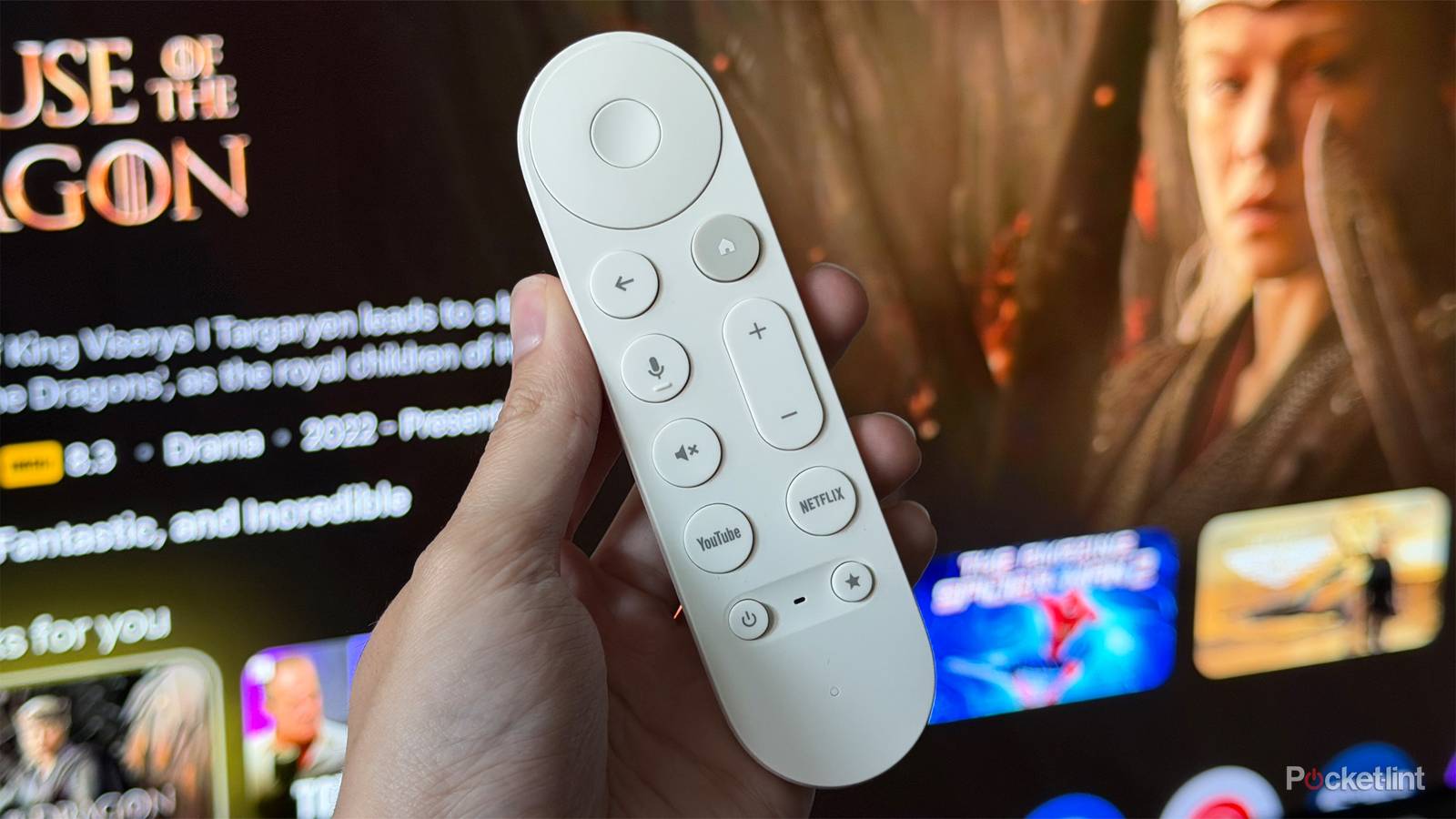
The button in the spotlight here is the Star (*) button on the Google TV Streamer remote, and you can assign it to launch any app you want. So if there’s one app you use every day, you can open it with a single button press instead of navigating through the home screen and going to your apps. It’s a small feature, but one that can make a noticeable difference in daily use, and it’s a feature more streamers should include on their remotes right out of the box.
How it all works
Google makes the process straightforward

If you have a Google TV Streamer, or you’re thinking about getting one, setting up the customizable button on its remote couldn’t be much easier. Just head to Settings > Remotes & Accessories > Set up remote buttons.
From there, you can customize the Volume control, Power button, and the Star button. Select the Star button to see three options: Google Home, Favorite App, or Device Input.
The Google Home option makes the Star button launch Google Home, giving you quick access to any compatible smart home devices connected to your Matter network. Device Input lets you use the Star button to switch your TV’s input, while Favorite App is the option I think a lot of people will get the most use out of, since it lets you assign the Star button to launch any app installed on your Google TV Streamer.
Personally, because the remote already has dedicated Netflix and YouTube buttons, I’ve set my Star button to launch Pluto TV, a free streaming service I’ve been watching a lot lately.

The whole setup process takes less than a minute, and it still shocks me that more streaming devices don’t include a customizable button like this on their remotes out of the box. Amazon still reserves the feature for its $35 Alexa Voice Remote Pro, Apple doesn’t offer anything similar, and while Roku does include a customizable button on the Roku Voice Remote Pro that comes with the Roku Ultra, its streaming sticks still ship with the basic Roku Voice Remote, which doesn’t have a customizable button at all.
I don’t think it’s a huge ask for every streaming device, regardless of price, to include at least one customizable shortcut button, especially since many remotes now include up to four shortcut buttons for sponsored streaming services. This is one of the many things the Google TV Streamer gets right, and I hope other streamers follow suit on their future devices.

- Dimensions
-
6.4 x 3 x 1-inch
- Connective Technology
-
Wi-Fi, Bluetooth
- Brand
-
Google
- What’s Included
-
Remote