I’m a big physical media lover. I built out a Dolby Atmos sound system for it, and I add to my 4K Blu-ray collection as much as my wallet can handle. I also have a 4K Blu-ray player for my collection as it ensures the best picture quality that I can get. While your PlayStation 5 is a fine player, it doesn’t have Dolby Vision, and that’s what led me toward a dedicated player.
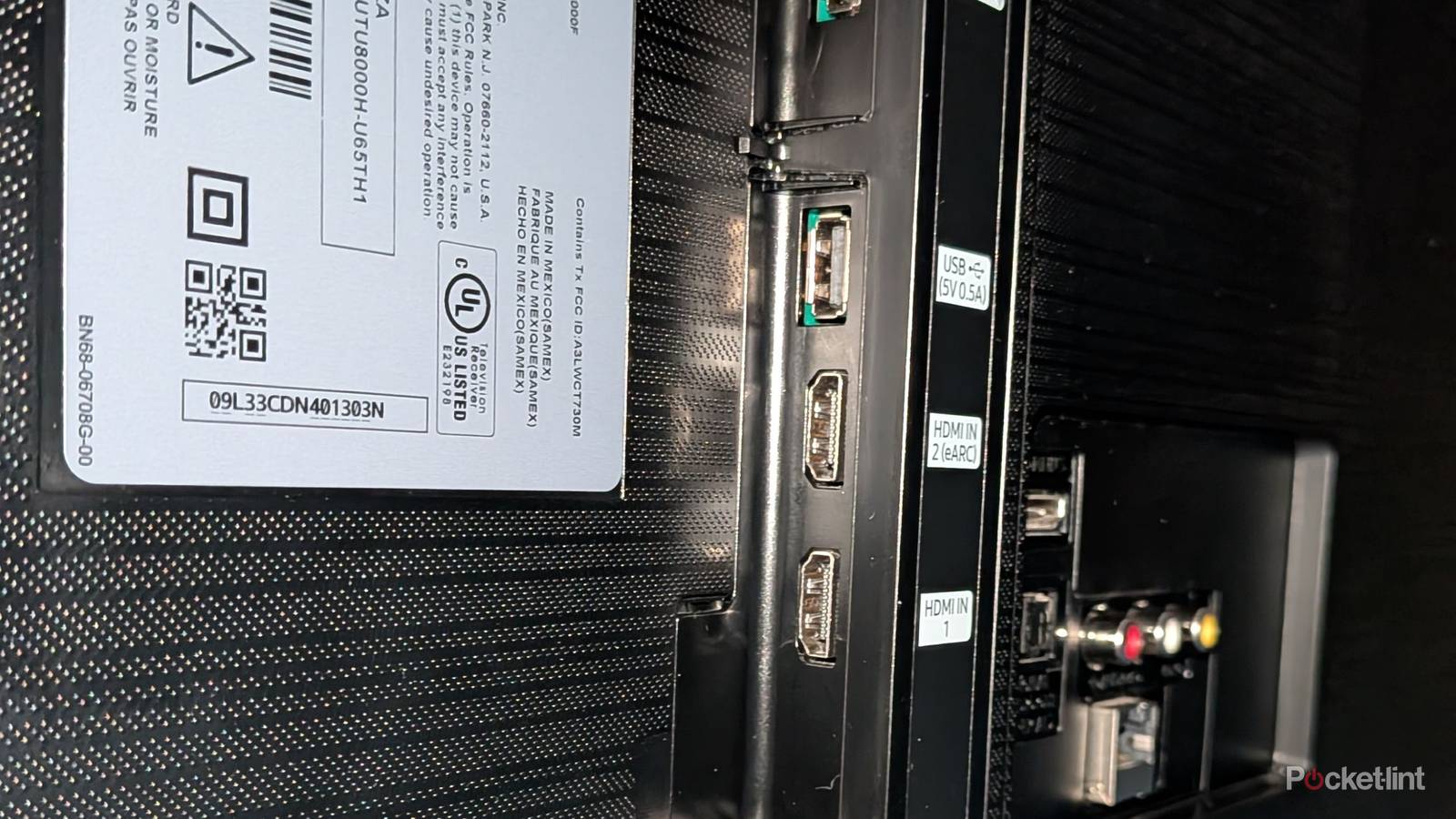
Getting a 4K Blu-ray player is just the first step. You need an HDMI cable to pair with it as well, and the good news there is that you don’t need the newest of the new. Your 4K player will do just fine with an HDMI 2.0 cable as that’ll still give it a 4K image and give it access to all the latest audio formats. What you really need to be aware of is what HDMI port you plug your player into. Yes, it’ll work in any of them, but you want to avoid the eARC or ARC port, depending on what your TV has.

- Dimensions
-
56.7″ x 32.5″ x 1.8″
- Display Technology
-
OLED
- Connectivity Technology
-
Bluetooth 5.1, WiFi 5
- What’s Included
-
Remote
- Brand
-
LG
- Refresh Rate
-
120Hz
This port is for your audio system
Receivers and soundbars go here

Audio benefits from having the most bandwidth that it can get, and that means you should pair your receiver or soundbar with not only an HDMI 2.1 cable, but also make sure it’s plugged into your TV’s ARC or eARC port. Of the two ports, eARC is the newer one, and older TVs might just have an ARC port. Whatever the case is, make sure you have your audio equipment plugged into that port instead of the Blu-ray player.
If your Blu-ray player is plugged into that port, it’ll still work, but it means you’ll be sacrificing your audio quality at the same time if you have a soundbar. Obviously, that’s not ideal if you went through the trouble of finding a dedicated audio source. Many soundbars have an HDMI port on the bar itself, so it can act as a middle man of sorts between your TV and Blu-ray player if you want to go that route. The same thing goes for an audio receiver that comes with a set of HDMI ports. If you plug your receiver into your TV’s eARC or ARC port, you can then plug all of your devices into the receiver as usual. Whatever you decide to do, the main thing to keep in mind is that your fancy eARC is meant for audio first and foremost.
Fortunately, it’s a very easy fix if you find yourself using the wrong parts, and it’s a lot more common than you’d think. Many TVs have the eARC port labeled with a different color, so it’s easy to fall into the trap of thinking that’s the most advanced port on your TV, and thus plugging your most expensive piece of technology into it. I fell prey to that before too, but it wasn’t a big deal when I didn’t have a sound system. It wasn’t until I started digging more into what these ports mean that I fixed my problems and picked up some better audio.
The correct port is still important
Use something modern

This isn’t really an issue with modern TVs as just about anything you find on the market comes with at least a blend of HDMI 2.0 and 2.1 ports, so there’s no going wrong in that regard. All you need to do is make sure you have at least an HDMI 2.0 cable or better to make sure you’re getting the best experience that you can. Believe it or not, you can still get a 4K signal from your old PS3-era HDMI cable, but you’re better off using something more modern. There’s also no reason not to do this since you can find newer cables for quite cheap.
Chances are that you don’t even have to worry about something like this since your player, and most electronics for that matter, likely come with a bundled cable that’s more than up to the task. Using the wrong cable is still common, but that’s more for things like a game console where it’s important to have a 2.1 cable for variable refresh rate and 120 FPS. Those things don’t matter for a Blu-ray player, so all you need is a semi-recent HDMI cable that can has at least 18 Gbps of bandwidth. From there, plug that cable into an HDMI 2.0 port, and enjoy your 4K Blu-ray player.
With the advent of HDMI 2.2, things are about to get even more confusing, but that won’t matter much for your Blu-ray player. As long as we stick with the 4K discs, and it looks like we will for quite a while, I don’t think there will be any issues with using the wrong HDMI cables.