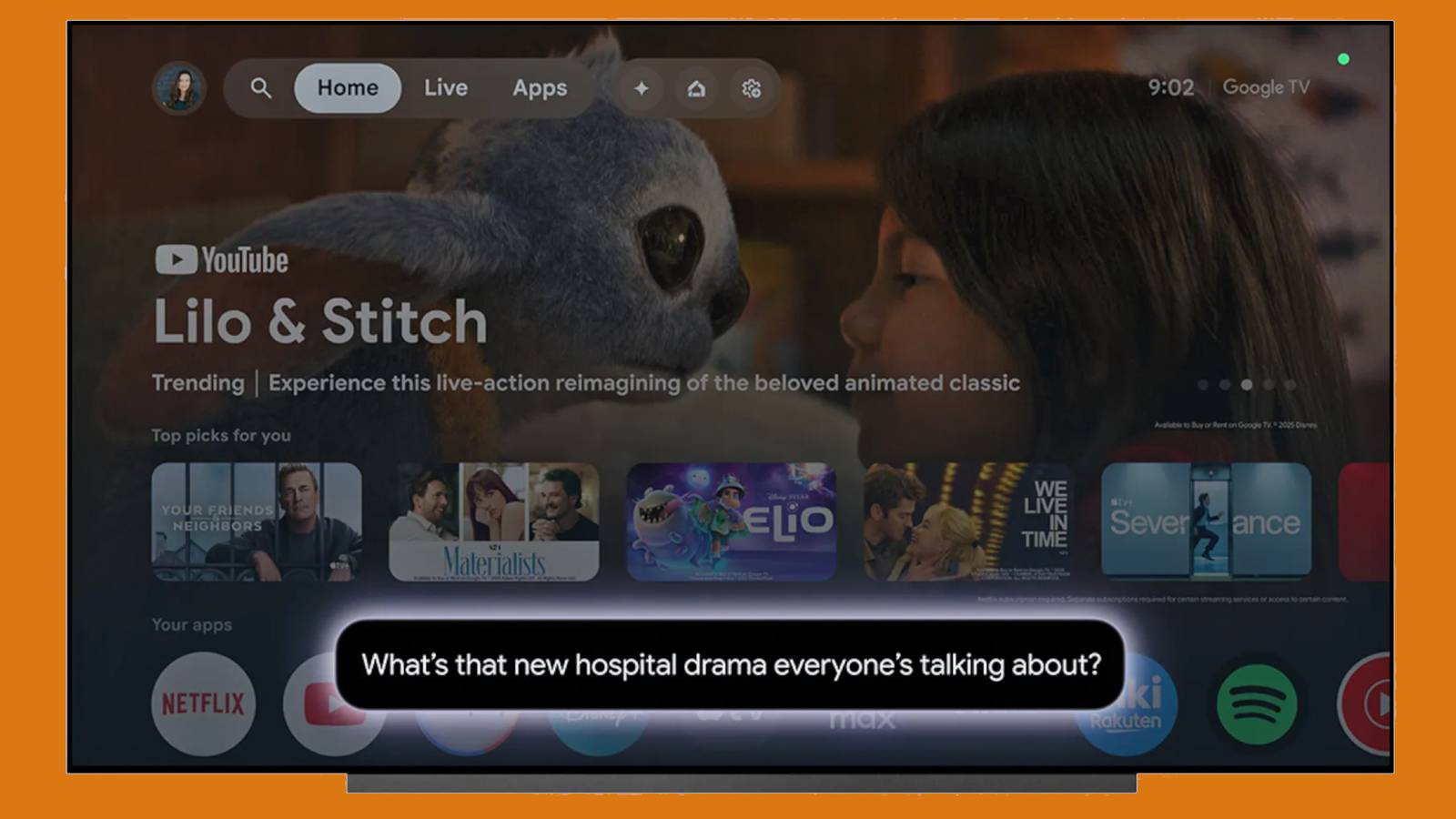
I’m not an AI apologist. While I do use some generative AItools for personal and professional reasons, I don’t completely trust their results, never mind buying into the idea that they’re a revolution pushing humanity forward (yet). I’ve seen them make far too many mistakes, or feed into confirmation biases. In my line of work, it’s a starting point at best — I have to doublecheck any facts I didn’t already know.
To give credit where it’s due, though, there are some places where AI assistants are genuinely helpful, even given the rough state of the tech. That includes your smart TV. While I wouldn’t buy a TV or media streamer based purely on which assistant it features, there are a few reasons why advanced AI can be a plus rather than just another gimmick.

AI assistants on TVs
Trivia challenge
From Alexa to Google Assistant — how well do you know the AI brains built into your smart TV?
Smart TVsVoice AIBrandsFeaturesPlatforms
Which AI assistant is built into Amazon Fire TV devices?
Correct! Amazon’s Alexa is the voice assistant powering Fire TV devices. You can use it to search for content, control smart home devices, and even check the weather without leaving your couch.
Not quite — the answer is Alexa. Amazon integrated its own voice assistant, Alexa, into Fire TV to create a seamless smart home and entertainment experience all in one device.
Which AI assistant is native to Samsung’s smart TVs?
Correct! Samsung developed Bixby as its own AI assistant, and it’s built directly into Samsung smart TVs. It can control the TV, search content, and interact with connected Samsung devices.
Not quite — Samsung uses Bixby as its native AI assistant. While some Samsung TVs also support Alexa and Google Assistant, Bixby is the one Samsung built in-house for its own ecosystem.
Google TV, found on many Sony and TCL televisions, is built on top of which earlier Google platform?
Correct! Google TV is essentially a redesigned interface and AI layer built on top of Android TV. It brings smarter content recommendations and tighter Google Assistant integration to the big screen.
Not quite — Google TV is built on Android TV. Google rebranded and enhanced the platform in 2020, adding personalized content feeds and deeper Google Assistant support while keeping Android TV as the foundation.
What phrase do you say to wake up Google Assistant on a compatible smart TV?
Correct! “Hey Google” is the standard wake phrase for Google Assistant across all devices, including smart TVs. It works hands-free on TVs that have far-field microphone support.
Not quite — the correct phrase is “Hey Google.” This wake word is consistent across Google’s entire ecosystem, from phones and smart speakers to Google TV-powered televisions.
Which of the following can AI assistants on smart TVs typically NOT do natively?
Correct! While AI assistants on TVs are surprisingly capable, editing video files is well beyond their scope. They’re designed for content discovery, smart home control, and information queries — not file editing tasks.
Not quite — the answer is editing video files. AI TV assistants like Alexa and Google Assistant can search content, control smart home devices, and answer questions, but they have no capability to edit media files.
LG’s webOS smart TVs feature which built-in AI assistant?
Correct! LG developed ThinQ AI as the intelligence layer behind its smart TVs and appliances. On LG TVs, ThinQ AI powers voice control and connects the TV to LG’s broader smart home ecosystem.
Not quite — LG uses ThinQ AI on its smart TVs. It’s LG’s own AI platform that handles voice commands and smart home integration, though LG TVs also support Alexa and Google Assistant as additional options.
In which year did Amazon first launch the Fire TV Stick with Alexa Voice Remote?
Correct! Amazon launched the original Fire TV Stick with Alexa Voice Remote in 2014. It was a significant moment in smart TV history, bringing affordable AI-assisted streaming to millions of households.
Not quite — Amazon launched the Fire TV Stick with Alexa Voice Remote in 2014. This was a pivotal move that helped popularize AI voice control for television, well before it became an industry standard.
Which smart TV platform uses an AI assistant called “Rokuten” or simply handles voice search without a named personal assistant brand?
Correct! Roku’s platform offers voice search and control but doesn’t market a named AI assistant persona in the same way Amazon or Google do. Roku keeps it functional and brand-neutral, focusing on content discovery.
Not quite — the answer is Roku. Unlike competitors that brand their assistants as Alexa or Google Assistant, Roku’s voice features are built into its remote and platform without a named AI personality attached to them.
Your Score
/ 8
Thanks for playing!
Tracking down recommendations and half-remembered favorites
At the beginning of potential

Like a lot of you, I imagine, I’m pretty picky about what I want to watch when I’m settling down for a movie. Back when rental shops were everywhere, I wasn’t the sort of person who would pick something just based on the box art — I wanted to know what the reviews were like, and equally importantly, if it would match my mood. Some of my favorite movies might be bleak dramas, but if I’m watching something with my wife or friends, chances are I’m going to pick an action or comedy title instead.
When it’s done right, an assistant like Google Gemini can not only serve up general recommendations — say, action movies over four stars, or starring Arnold Schwarzenegger — but things you would’ve never thought to look for. Hypothetically, a request like “action movies with realistic martial arts set in Hong Kong” or even “coming-of-age dramas with an existentialist philosophy” will turn up perfectly valid results based on plots and reviews, not just the same filters you might set with a few remote clicks.
As generative tech develops and learns more about the content of movies, not just their synopses, there may be some wild potential. My dream is that I can one day ask “what was that movie with a bunch of people sitting around a blue table with a firepit in the middle” and have it realize that I’m talking about Jodorowski’s The Holy Mountain. I tried asking Gemini that question just now and got another wrong answer — it hallucinated a scene from The Menu, a movie I’ve seen twice that may have tables and fire, but not in the way I described.
Advanced smart home control
Taking out the complications…usually

I’ve long been a champion of smart home tech. Yes, there can be privacy concerns to manage, and setting things up can potentially be expensive and complicated, depending on your ambitions. But when it’s done right, it’s genuinely convenient, and can radically transform a space. At this point, I can’t imagine sticking to boring white ceiling lights in a bedroom or living room, or wasting the money a “dumb” thermostat can cost you.
You’ve long been able to run basic smart home commands via Alexa, Siri, or Google Assistant, “like turn off the living room lights” or “show me the front door camera,” but generative assistants like Gemini and Alexa+ are enabling commands that are both more complex and natural, like “turn off the living room, and give the office a purple glow.” With Alexa +or Gemini, it’s even possible to create automations based entirely on voice commands, although this is unfortunately limited to Amazon Prime and Google Home Premium subscribers for now.
More directly relevant to smart TV usage is the ability to get more precise info out of your cameras. While it’s nice to be able to bring up a feed when someone pushes the doorbell, something like that Gemini/Home Premium combo might tell you not just that Roger is at the door, but that he’s carrying a package. Speaking of packages, I’m hoping that AI becomes contextually aware enough to recognize that that UPS truck pulling up probably has the new EUC I ordered.
All this matters because of those complications I mentioned. Fiddling with apps or trying to guess what voice commands to use are just two of the hurdles that have deterred people from adopting smart home tech. The current paywalls are a new problem, but hopefully some of these features will make their way to free space once there are even more advanced AI technologies to sell.
Remember your skeptic’s toolkit

As I said up top, I can’t fully trust generative AI, and that’s doubly true when it comes to teaching myself or my son. LLMs (large-language models) not only don’t understand want they’re parsing, they’re often coded to please you no matter what. If you ask questions with the assumption that astrology is real, they’ll likely serve up answers to match — never mind that astrology has been repeatedly debunked, and doesn’t even keep itself aligned with the shifting constellations. Today’s night sky doesn’t look anything like it did when astrology was invented thousands of years ago.
That said, if you’re skeptical and already reasonably well-educated, a TV with generative AI can be hard to beat. It’ll not only answer complex questions, but suggest videos to watch for more details. It’s not inconceivable that within a few years, your TV might be able to offer a full presentation on a given topic, although I have my doubts about that happening. The focus is on getting you into ad- or subscription-based services, such as Google’s own YouTube.
Something that isn’t praised often enough is the ability to ask for answers at a particular education level. I might be familiar with black holes, but trying to explain them to an eight-year-old without referencing a Schwarzchild radius or general relativity can be a challenge. If you ask Alexa+ or Gemini to explain it to someone in Grade 2, you should get a pretty solid response.
Simplified TV controls
A little less friction, a little more action

This is last on my list because it’s probably something you’re already enjoying to some degree, regardless of how advanced your TV or streaming box is. It’s a game-changer to be able to say “turn on subtitles” or “rewind 4 minutes” instead of messing with awkward UIs that can change from app to app. Trying to scrub through Saturday Night Live in the Global TV app makes me want to tear my hair out.
From here, it’s really just about expanding voice commands to every facet of your TV, and enabling some of those more natural expressions that already help find movies or control smart home accessories. Sentences like “make the picture brighter,” “enhance dialogue,” or “turn on audio passthrough” should be as standard as any other command. Those may even work on your particular TV, but they’re not necessarily something you can assume will work.
The endgame in all this could be having a TV able to adjust many different settings at once based on what you’re trying to watch. For an example, imagine a request like “I’m about to watch Blade Runner 2049. Could you improve the picture for that, and make sure Dolby Atmos is working on my soundbar?” What constitutes “improvement” for a movie is obviously subjective, but even if an AI got it wrong at first, that might still serve as a useful baseline.