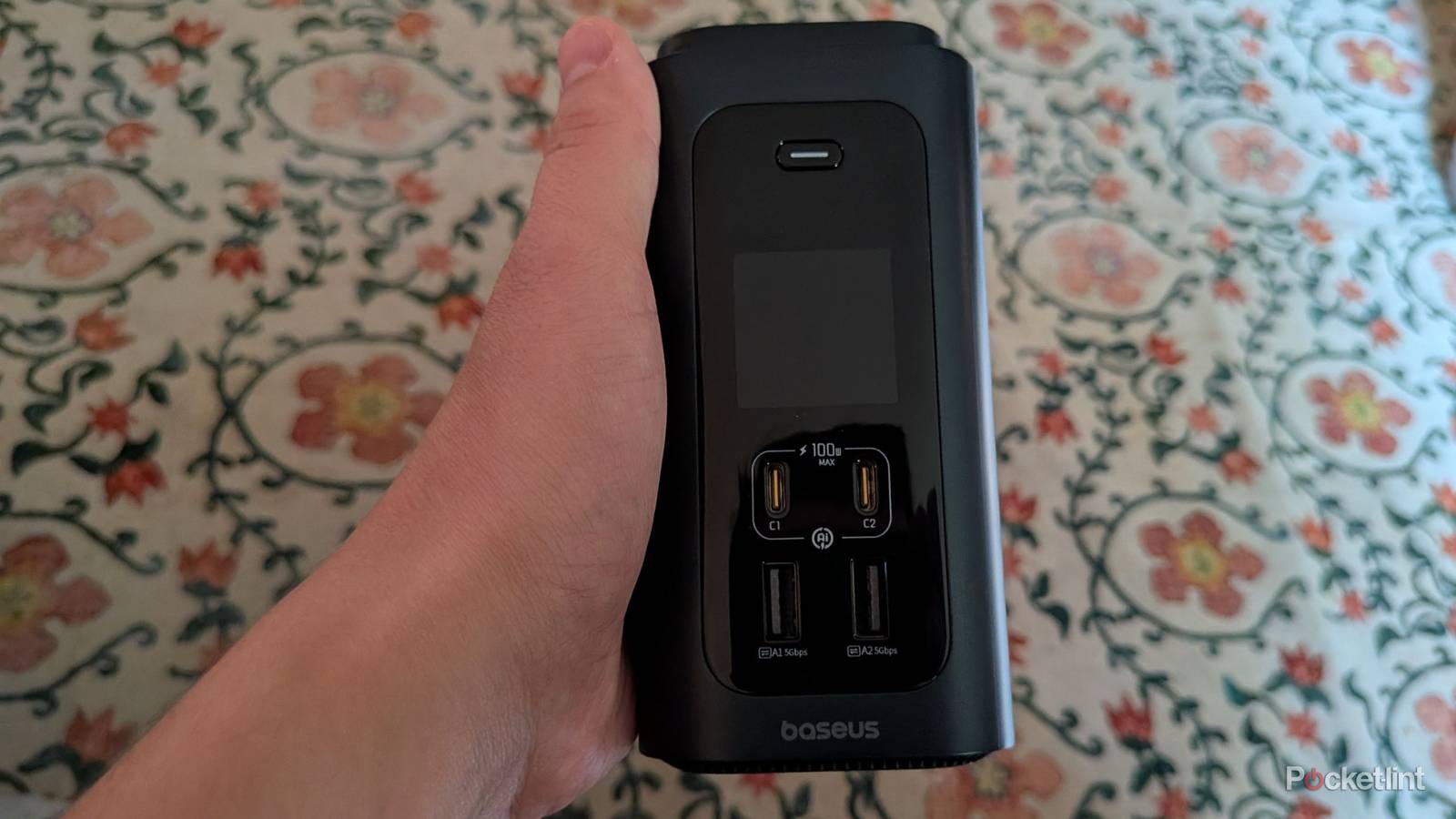
USB hubs have become almost essential for people who use laptops and phones, especially since these devices seem to be shedding extra ports with each passing year. Hubs have been a good way of adding those ports back, but I’m doing something different with the Baseus Spacemate RD1 Pro. Instead of plugging this into a laptop — which it’s perfect capable of — I’m using it with my desktop PC. In fact, I’ve been using it with my PC ever since I got it, and it’s completely transformed my desk.
I’m not sure what happened, but years ago, my computer case stopped registering all four of my front USB ports. It’s probably a loose wire or something, but since I didn’t really rely on those much, I never thought much of it. When I needed to use a USB port, I’d have to crawl under my desk and plug something in. After picking up an Android gaming handheld, I found that I needed to go back and forth with an SD card, and that meant a lot of crawling under my desk. That’s not necessary any longer, thanks to the Spacemate RD1 Pro. This is an excellent, but very expensive, USB hub.


4/5
- No. of ports
-
2 HDMI, 2 USB-C 10Gbps, 4 data-only USB-A, SD/TF slots, Ethernet, 2 USB-C (PD 100W Max.), USB-C host, Qi Wireless Charging
- Power output
-
160W
- Display modes
-
2
The Baseus Spacemate RD1 Pro is a 15-in-1 docking hub for your laptop or PC.
- 15 ports
- Wireless charging
- Small size
- Expensive
- Heavier than I’d like
Baseus Spacemate RD1 Pro specs
An expensive juggernaut
The Baseus Spacemate RD1 Pro has a ton of versatility, and it’s a perfect addition to any desktop or laptop setup. The only problem is that it costs $300, so it’s a tough pill to swallow. I can’t deny that its 15 ports don’t have a lot of value, and I even use the wireless charging pad more than I thought I would. We’re talking about an SD card slot, several USB-C ports, several USB-A ports, HDMI ports, and an Ethernet port.
This docking hub gives your laptop a lot more wiggle room if it lacks ports, but it costs almost as much as a budget laptop would. It’ll come down to whether that’s worth it to you or not, because while I love this hub, there are certainly cheaper alternatives.
- No. of ports
-
2 HDMI, 2 USB-C 10Gbps, 4 data-only USB-A, SD/TF slots, Ethernet, 2 USB-C (PD 100W Max.), USB-C host, Qi Wireless Charging
- Power output
-
160W
- Display modes
-
2
What I like about the Baseus Spacemate RD1 Pro
It does it all

It’d be a lot easier to list off the things I don’t like about this hub, but that’s for another section. I like pretty much all there is to like about this hub, and I’m going to use it every day for as long as it works. It’s a very versatile device, and after using my SD card for everything I need, I actually moved the hub over to the power strip I have my PC plugged into just so I don’t have to have my PC for when I want to use it. Now that I don’t have to have my PC turned on to use it, I actually use it more often. There’s a wireless charging Qi2 pad on top of the device that I set my Pixel Buds Pro 2 on top of to charge. I also use two of the fast-charging 100w USB-C ports on the front to charge my phone and FitBit Air, respectively.
I actually haven’t found many ways to use the back of the device all that often yet. The SD card port is great for when I need it, and I have been using it more often than I initially thought I would. The pair of HDMI ports are great for adding additional screens to laptops, but I don’t need that for my PC at the moment. Importantly, there are a pair of 480 Mbps USB-A ports on the back, and there’s an Ethernet port for people looking to add some stability to their laptop. All in all, this is an excellent hub that would be perfect for just about anybody who needs the ports.
Another thing worth mentioning is the small footprint. It’s not a light hub by any means, but it’s about the width of a water bottle, so it doesn’t take up a ton of space on my desk. I have a pretty clear desk as it is, but I don’t think it’d be difficult to fit this on a cluttered desk, especially if it means you can get some cables organized a bit better. The dock has a pair of modes to pick from, too. When I have it plugged into the power strip away from my PC, it’s always in charging mode. When it has a host, like a laptop or desktop, you can pick the Hybrid mode that opens it up for not only charging, but data transfer and video as well. This is how you use the SD card reader and the pair of HDMI ports. Switching between the modes just requires holding the screen button down for two seconds. If you ever forget the steps, they’re printed on a sticker on the side of the hub. I just kept mine attached to the side, but you can peel it off for a cleaner look.
What I don’t like about the Baseus Spacemate RD1 Pro
Price is the main factor

As much as I love using this hub, I have to understand that I received it free of charge for review purposes, and others won’t be in that same boat. I’ve used USB hubs in the past and liked them, and none of them rivaled the $300 price tag you see here. Keep in mind that this is a 15-in-1 hub, and if you don’t need all those ports, there are far cheaper options to choose from. If you stay in the Baseus family, you can find a similar USB-C 11-in-1 hub for $200. The point is that I think you will only be able to stomach the price tag here if you’re willing to use all the ports. If you don’t need all of this, you can downgrade to something more affordable while still coming away with a good product.
Another downside is the weight of the hub. I understand that it pretty much comes with the space, but this hub comes with some noticeable heft that would greatly weigh down a bag. I wouldn’t want to move this back and forth between rooms or buildings, so it’s best suited for a long-term home on a desk. Fortunately, that’s where I have mine, but if you want to bring yours to work and connect some extra monitors to your laptop, you’ll have to deal with the extra weight.
Other than these two problems, I don’t have a lot to say that’s bad about the hub. I think the deciding factor for a lot of people will be the price tag. I don’t know if I’d want to shell out $300 for this hub, but after using it for a few weeks, I also don’t want to go back to a world where I don’t have it.
Should you buy the Baseus Spacemate RD1 Pro?
If you can afford it, yes

Ultimately, I recommend the Baseus Spacemate RD1 Pro. It’s an excellent hub for all your devices, and if you can manage the price tag, it’ll make an excellent addition to your desk. It doesn’t take up a lot of space, it adds a ton of versatility to both a laptop and a desktop, and the wireless charging pad is an excellent touch.
If you don’t need all the ports the Spacemate RD1 Pro has to offer, there are other, more affordable options. I loved my time with the hub, and it saved me a lot of trouble from having to dig around my PC’s USB ports since I had everything on my desk instead of under it. It’s also a great addition to a laptop without a lot of ports, but I don’t think most people need the sheer number of ports on display here. If you do, then look no further than the Spacemate RD1 Pro.
- No. of ports
-
2 HDMI, 2 USB-C 10Gbps, 4 data-only USB-A, SD/TF slots, Ethernet, 2 USB-C (PD 100W Max.), USB-C host, Qi Wireless Charging
- Power output
-
160W
- Display modes
-
2