


Smart TVs come with so many features today that it can be very difficult to find out what does what. Many people just plug their TV in and start watching things, and that’s perfectly fine. There’s nothing wrong with your TV out of the box, but there are quite a few changes you can make in the settings that’ll get your TV running the best that it can. These are totally optional things to do, but I always like to squeeze out the best performance that I can.
Most of these changes take mere seconds to set up, and they are great quality of life options. For example, one of these makes it so you don’t have to use multiple remotes anymore. Yes, that’s right. You can just use one remote to control your devices if you’d like to. There are so many underrated HDMI settings to list, and I’m just touching on the tip of the iceberg with this list. At the very least, this is a good start, and they will be settings that you’ll wish you had turned on earlier.
Make sure you’re using HDMI-CEC
A massive upgrade

If you’re like me, you have a TV, an Apple TV 4K, and a receiver. Okay, maybe that’s not totally common, but I know there are people out there with all three. For a long time, I had to keep three remotes handy to control each of these devices, and it grew to be an annoyance as it meant my ottoman was for remotes instead of my feet. The answer to that problem is HDMI-CEC.
Turning this on every device that supports it means that one remote can control your whole setup. What I ended up doing, which wasn’t the smartest thing in hindsight, was make my Apple TV remote control everything. This remote doesn’t have a lot of buttons on it, but it was still able to turn on all my devices, change the volume, and navigate the menus. It did everything I needed. Eventually, I upgraded to a universal remote that gives a lot more versatility, but this was a very nice setting for the time I used it.
Plug your devices into the right port
Not every HDMI port is created equally

Modern TVs have largely gotten rid of the old formats in favor of HDMI. This means you have little choice but to plug your devices into the ports, but what you might not know is that your ports don’t all do the same thing. First things first, you have to differentiate between your HDMI 2.0 and 2.1 ports. Both of these ports give your 4K 60 FPS access, but the HDMI 2.1 sweetens the pot a little more. Thanks to the extra bandwidth offered by HDMI 2.1, you can take advantage of things like VRR and 120 FPS on your PS5 and Xbox Series X. These are big selling points of these consoles, and you can’t get them if you have your cables plugged in wrong.
It’s also important to note that just because you have a 2.1 cable plugged into a 2.1 port doesn’t mean you’ll automatically get these features. Your TV also has to have the software to make this possible, and that’s not always the case, especially if you have a budget TV. It’s becoming more affordable to get access to features like this, but it’s still difficult to find in a $500 or so TV without something being on sale. However, you don’t have to spend well over $1,000 to get 120 FPS anymore.
Turn on HDMI Enhanced format
An important step to take

This one builds off the point that mentioned VRR and 120 FPS. You can’t actually use these features unless you use a HDMI Enhanced format, which might not be on by default. Turning on this setting is actually really easy, but it requires you to navigate your settings. On my Sony X90J this can be found in the HDMI signal format. and if you want to use VRR, you have to select that option. It does create the annoying situation of having to pick between VRR or Dolby Vision, so I have a workaround for that.
Instead of having to change my settings each time I want to watch or play something, I just have HDMI 4 set to VRR and HDMI 3 set to Dolby Vision. I have my receiver plugged into the HDMI 3 spot, and I have my 4K Blu-ray player and Apple TV 4K plugged into my receiver. This means I get Dolby Vision on movies and TV shows, and I don’t have to change any settings. I have my Xbox Series X plugged into my TV’s HDMI 4 port with VRR enabled so I can use 120 FPS VRR. I still get access to regular HDR10 by taking that path, so it’s not a huge tradeoff. I’d like to have access to both at the same time, but it’s not in the cards for my TV.
Use HDMI passthrough if you need it
Share the load

HDMI passthrough is a very nice feature that a lot of people might not know about. A big reason for that is because you need a soundbar or receiver to really take advantage of it, and not everybody has those things. What it does is pass along the audio uncompressed to your audio system so it can handle it for you. If you have a receiver or soundbar, that’s exactly what you want to happen, because chances are that your sound system can handle more audio formats than your TV can — although many modern TVs cover a lot of bases these days.
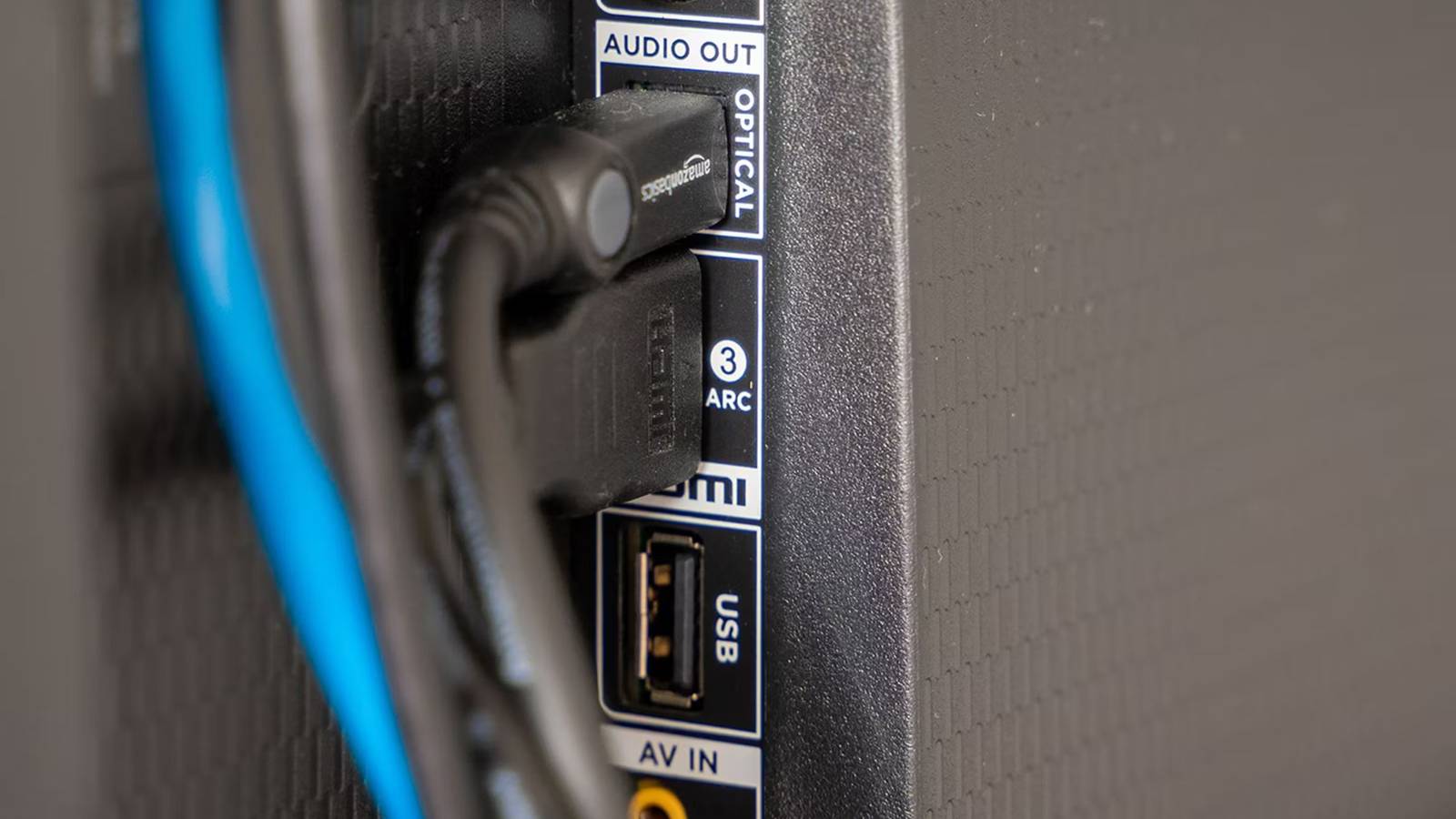
This ensures that whether it’s a format like DTS:X or Dolby Atmos, you’ll be getting the best audio that you can. This doesn’t matter at all if you have your streaming box plugged directly into your TV as there’s nothing to pass along. HDMI passthrough only matters if you want your streaming box to act as a middle man. If you have your receiver or soundbar, make sure it’s plugged into your TV’s ARC or eARC port as that guarantees you’ll be getting the best audio that your TV has to offer. This is a port that should be labeled on your TV, so you can’t really mess it up.
I do know many people who have other devices plugged into that port, which is perfectly fine if you don’t have anything better to put in the spot. Once you get your sound system, then you need to start moving some things around. Also, if you have an Apple TV 4K, you don’t actually get audio passthrough for whatever reason. I hope Apple adds it down the road, but I’m not holding my breath.