


If there’s anything people miss about the pre-streaming days of TV — aside from a shared culture — it’s probably getting all your services in the same place. With the right cable or satellite package, if you want to flip from NBC to HBO, it’s as simple as scrolling through channels or punching in the right number. Conversely, if you want to change from Peacock to HBO Max, you normally have to install separate apps, and of course maintain two active subscriptions.
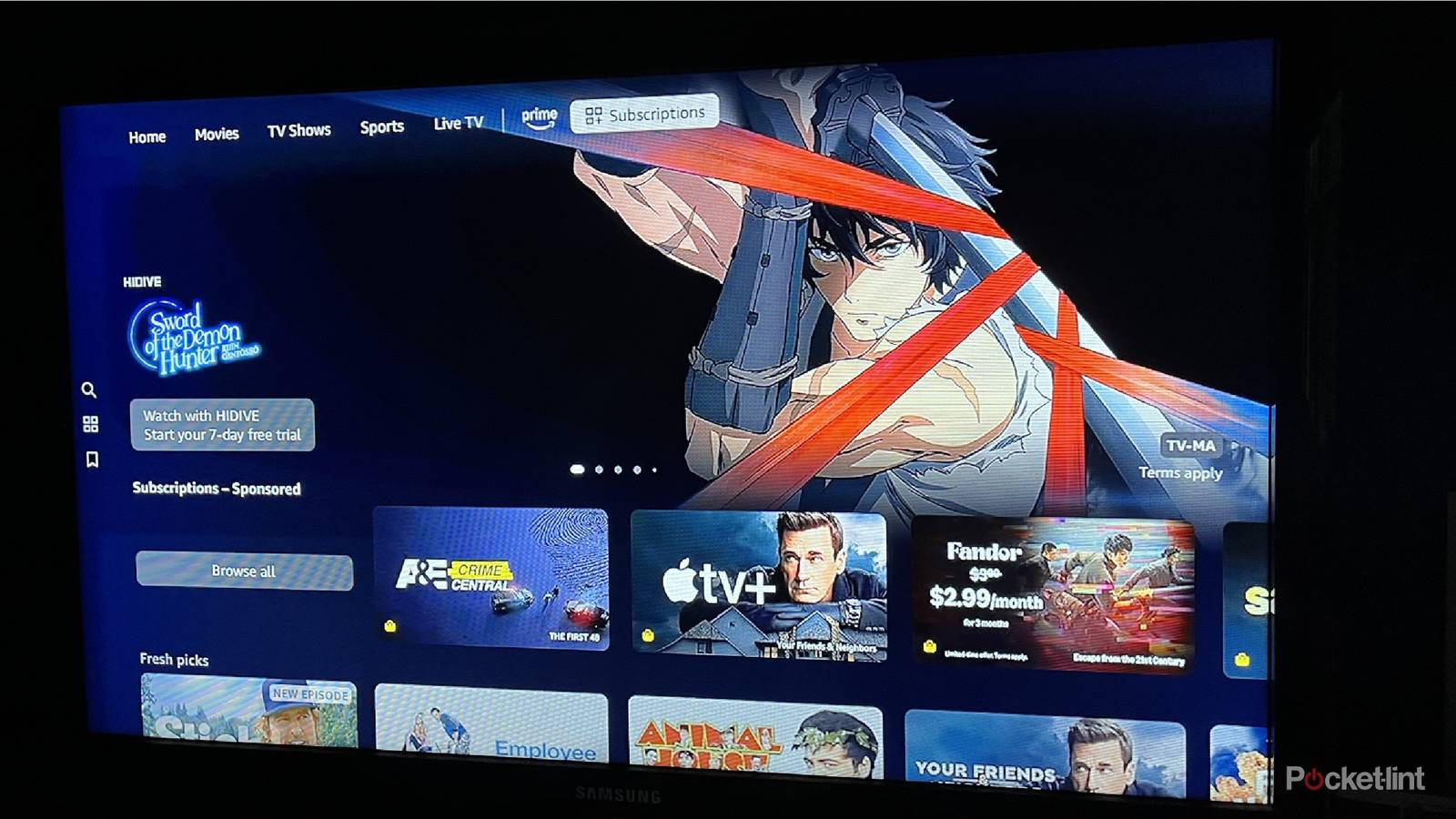
Some companies exploit this issue to unite outside services (“channels”) within their own apps, perhaps the best known providers being Apple TV and Amazon’s Prime Video. I’ve occasionally taken advantage of this — but I’d say that in most cases, it’s just not worth it, and your convenience is definitely not the reason this exists.
The promise and the trap
A walled garden has a price to pay

Typically, the thing that’s used to lure people in is access to a specific movie or show. We all know the pain of wanting to watch something, only to discover it’s barricaded behind a service we don’t normally use, or might never have been aware of. Recently, for example, my wife and I wanted to watch Sweeney Todd again, only to discover there was no easy way to stream it outside a rental, or else signing up for an obscure Canadian service. Before that, I recall wanting to watch the Phil Tippett movie Mad God, and learning that it was a Shudder exclusive. I’m not enough of a horror fan to pay for that service every month.
There are a couple of practical advantages to signing up for in-app channels, beginning of course with the fact that you get to browse a wider selection in a single place. I know that when I’m looking for something new to watch, I often end up cycling through multiple apps before settling on something. Funneling everything eliminates this hassle, and may even nudge you towards titles that wouldn’t otherwise be on your radar. I suspect a lot of people saw Skinamarink or Late Night With the Devil this way.
The other perk is centralized billing and control over subscriptions. Some people simply prefer this arrangement, and I don’t entirely blame them. Subscribing to services independently means more logins to remember, and more interfaces to navigate if you want to manage payments and other account details. If you don’t particularly care about a service anymore, it should (in theory) be easier to flip one off through a single provider, as long as you’re familiar with the way the host app works.
The incentive for streaming services to offer these channels is that they take a cut of the revenue. So while they can’t conceal that you’ve got an add-on active without risking legal trouble, they’re not going to go out of their way to make quitting quick.
In practice, however, centralizing things can backfire, one of the biggest issues being how easy it is to forget you’re subscribed to something. With multiple services blended into one, there can be few if any reminders that you’re being charged more, or that you have any extra content to begin with. That was my experience with the service I saw Sweeney Todd on. I signed up for a seven-day trial through Prime Video, and only remembered that the add-on was active after I got the auto-renewal bill. That was a rude awakening at a time when money was tight.
Billing structures can be part of the problem here. While Amazon is good about separating fees, other companies may not be. One example is Roku, which bills you for channels under its own name rather than itemizing them. It’s not hard to find online complaints about mysterious Roku charges that turn out to have been from forgotten subscriptions.
This probably isn’t an accident. The incentive for streaming services to offer these channels is that they take a cut of the revenue — so while they can’t conceal that you’ve got an add-on active without risking legal trouble, they’re not going to go out of their way to make quitting quick, either. Indeed if you want to cancel a channel you picked up through Apple, Amazon, or Roku, there’s a good chance you’ll have to look up the instructions on the web, since the process isn’t as intuitive as it should be. To cancel a Prime Video channel, the simplest way is actually to go to the Amazon or Prime Video websites on your computer, then navigate a couple of menu layers deep.
You might be wondering why the channels themselves would agree to a revenue split when they would otherwise claim a full cut. The answer is exposure — the host platforms I’m talking about are so endemic in the streaming space, the split is worth it for the number of additional customers they rope in. Even famous brands like HBO and Paramount can benefit. Arguably, some smaller services might have died on the vine without the likes of Apple and Amazon propping them up.
The better road to take
A few concluding thoughts

I’m not saying you should always and forever avoid add-on channels. When you do sign up for them, though, I’d recommend doing so only briefly, with specific movies or shows in mind. More importantly, set phone reminders ahead of renewal dates. It’s all too easy to miss any official reminder messages, which you probably won’t get in the first place.
For long-term commitments, keeping subscriptions separate is preferable, and not just to avoid unwanted spending either. Tying multiple services to a single provider is liable to keep you locked into that ecosystem. Even if you get separate login credentials, you’ll still have to come back to the same company for billing, and may once again find yourself lured by the convenience of having everything in one place.
Set phone reminders ahead of renewal dates. It’s all too easy to miss any official reminder messages, which you probably won’t get in the first place. For long-term commitments, keeping subscriptions separate is preferable.
Getting locked in may not seem so bad, except that you won’t necessarily be picking the best hardware and software for your lifestyle. Let’s say you’ve got a bunch of subscriptions managed through Apple TV. You can certainly access those channels without an Apple device, but since the experience is typically more seamless on Apple products, you might be persuaded to buy something like a Mac when you’d be happier with a more powerful Windows PC. On the flip side, you might not get to experience the smoothness of an Apple TV 4K if you’ve tossed your chips in with Roku.
All this makes me wonder if some sort of regulatory intervention isn’t coming at some point. I doubt it, given the current political climate and bigger fish to fry — but no one likes having their inattention or bad memory exploited in a way that affects their bank account.

- Brand
-
Apple
- Bluetooth codecs
-
5.0
- Wi-Fi
-
6
- Ethernet
-
Gigabit (128GB model only)