


Once you try watching YouTube without ads, it can be hard to go back. Ads might not run as long on the average YouTube video as they do on broadcast television, but watching them before, during, and sometimes even after a video gets old fast. Especially when many videos are also sponsored. Avoiding those ads can make paying $16 per month for YouTube Premium reasonable. The subscription is good for more than just removing ads from YouTube, though.
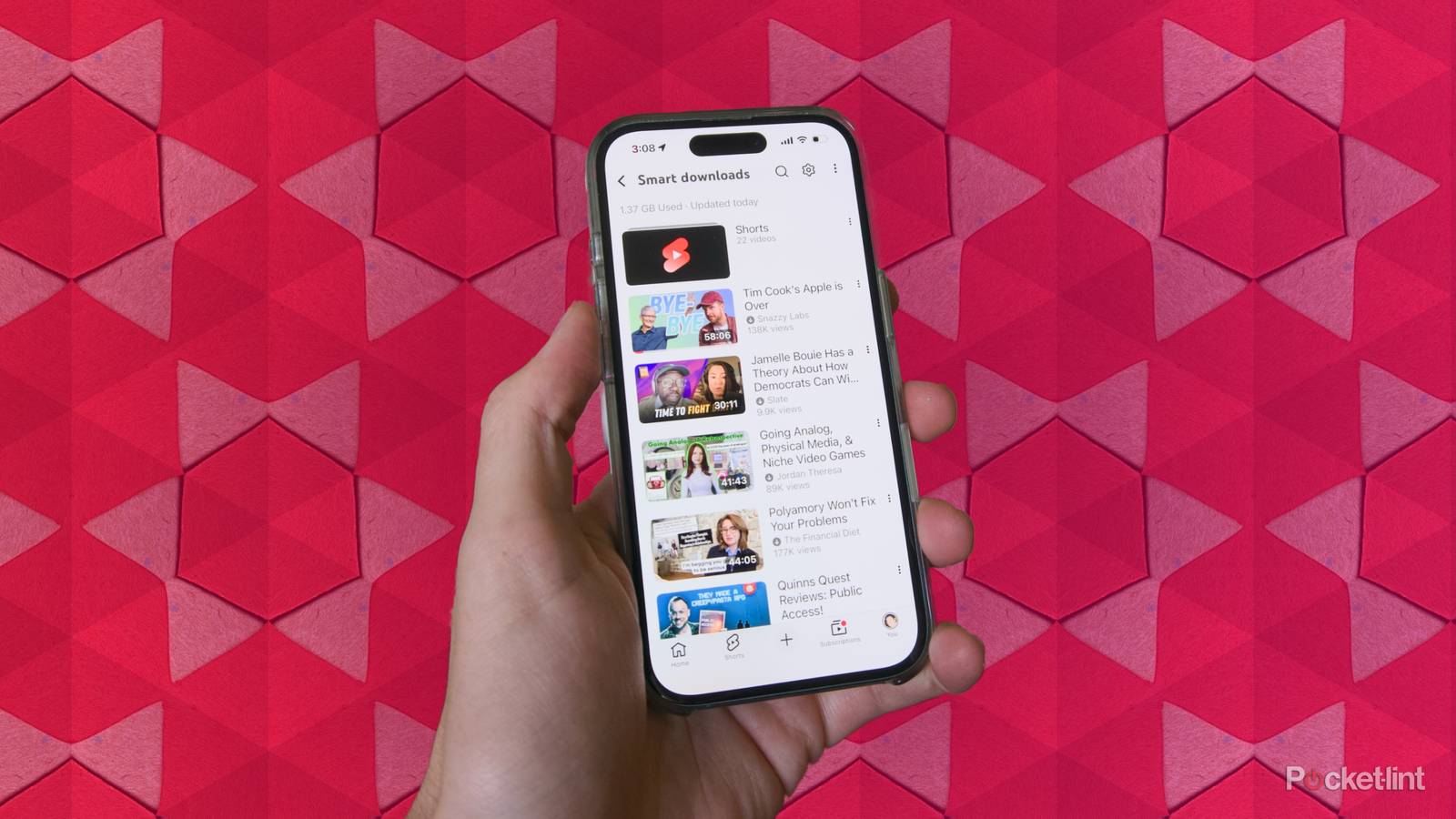
Premium gets you ad-free viewing, music streaming, and plenty of other perks. What’s been surprising for me as someone who originally signed up for the subscription to avoid ads, is that I’ve actually found “Smart Downloads” to be a critical feature. YouTube offers a way to save videos to watch offline, but the platform’s system for automatically downloading videos to watch has not only saved me when I was stuck on a long flight, it’s also gotten me to try videos I might not have watched otherwise. On its own, it’s not reason enough to subscribe, but it might be the best perk on offer other than YouTube Premium’s ad-free experience.
YouTube Premium caters to power users
The features make sense if YouTube is your primary source of entertainment

YouTube Premium is the end product of multiple attempts by Google to offer a subscription that people who use the company’s free apps and services would be willing to pay for. That started with Google Play Music in 2011, and later YouTube Music Key in 2014, which introduced the idea of ad-free YouTube videos, though only with music videos. The basic features of YouTube Premium wouldn’t coalesce into one product until the launch of YouTube Red in 2015, which applied the ad-free element of Music Key to all the videos on the platform, and introduced the idea of original shows and movies that were only available to subscribers. YouTube Red would later be rebranded as YouTube Premium, and the YouTube Music streaming service (itself the result of Google’s messy approach to product development) was added as a bonus.
Automating the process of downloading videos makes a lot of sense, but subjecting myself to what Google thinks my taste should or could be is just as interesting.
When you pay for YouTube Premium you receive the ability to stream music through YouTube Music, and the following benefits:
- Ad-free videos
- Background playback
- Picture-in-picture
- Offline downloads
I signed up for YouTube Premium to remove ads (and I’ve dabbled with using YouTube Music as my primary streaming service, on occasion), but of the features the subscription offers, offline downloads have become one of the most helpful, and particularly a version of the feature Google calls “Smart Downloads.” With Smart Downloads enabled, my YouTube app automatically downloads a collection of recommended videos for me to watch offline, based on my watch history. Automating the process of downloading videos makes a lot of sense, but subjecting myself to what Google thinks my taste should or could be is just as interesting.
Letting YouTube pick what you watch is a lot of fun

The Criterion Channel exists now as a highly curated streaming service for independent and classic cinema, some of which The Criterion Collection has released on physical media. Before that, though, the service kicked the tires on its streaming tech by offering one movie a week in the lead up to its full launch. The “Movie of the Week” program was thrilling for a film lover like me, because each movie was a surprise, and on more than one occasion it led me to watching something I loved that I wouldn’t have seen otherwise. Key to the whole experience was the dearth of other options. All the Criterion Channel app had was one movie at a time, so I felt more inclined to just try it rather than scroll around browsing other options.
In many cases, Smart Downloads gets me to do the same thing. Because it’s downloading videos to watch in the background, I don’t have a clear idea of what I’m going to get, and without a consistent internet connection, I don’t have any other options to watch. It’s already led me to try videos from creators I normally skip on my YouTube home page. It can be scary to give YouTube so much control over your device’s storage without knowing what you’re going to get, but you can set deliberate limits so that the app doesn’t burn through your storage:
- Open the YouTube app.
- Tap on your profile icon and then tap on the gear icon to open Settings.
- Scroll down to the Video and audio preferences section and tap on Background & downloads.
- Tap on Adjust Smart downloads.
- Leave Storage use on Auto if you want YouTube to adjust the size of downloads based on your usage, or tap Custom to set a specific limit.
- Adjust the slider to change the amount of space you want to dedicate to downloads.

You can also adjust the resolution of the videos YouTube downloads to stretch the space you set aside even further:
- Open the YouTube app.
- Tap on your profile icon and then tap on Downloads.
- Tap on the gear icon in the top right of the screen.
- Tap on Download quality and choose between Full HD (1080p), High (720p), Medium (360p), and Low (144p).
Those settings can give you some peace of mind if you’re worried about how YouTube uses your storage, and you can also manually download any video you want to save for later for even more control. You can download any video just by tapping on a video in the app and then tapping on the Download button under the video’s title.
YouTube Premium is worth it for now
The subscription price does continue to rise, though

Most people hang on to YouTube Premium to remove ads, and rightly so. The number of ads included in most YouTube videos has increased since the video platform launched, and Mashable reported in 2025 that Google has developed a tool to place ads right when a video is at its most interesting. The cost of YouTube Premium has also recently increased, which makes the extra features of the subscription even more important to take advantage of.

- What’s included?
-
Ad-free YouTube, YouTube Music, background playback, offline downloads
- Price
-
Starts at $16 a month
- Live TV
-
No
YouTube Premium is a subscription service that offers ad-free viewing, background play, and access to YouTube Originals and downloads for offline use.
If Smart Downloads don’t seem like your speed, it might be worth it for the frequent new experimental features Google tests and the options for enhanced audio you can take advantage of on YouTube and YouTube music. Someday, the cost of YouTube Premium may outstrip its benefits, but for now it feels like Google is getting the balance right.