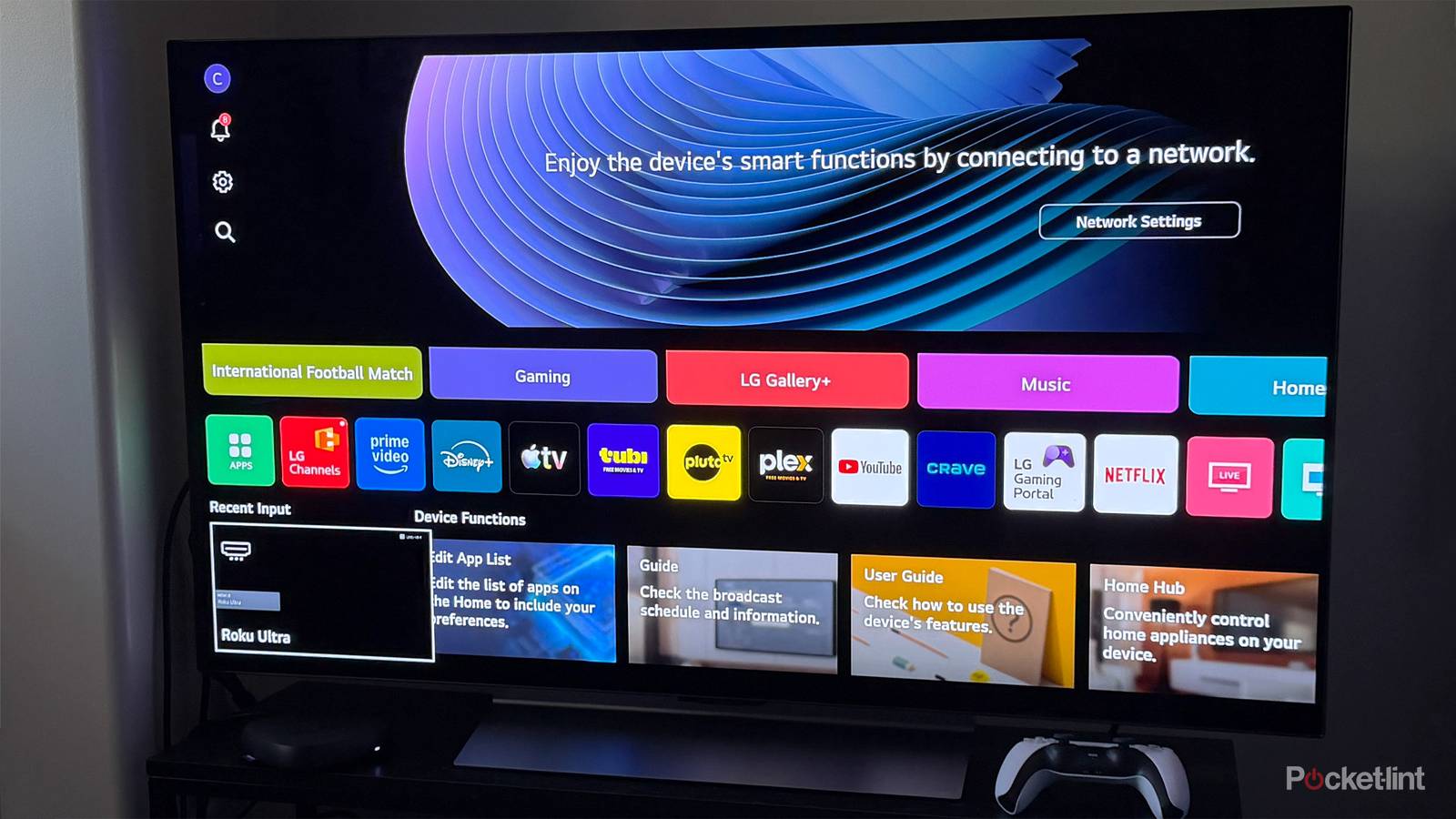
I’ve always been the type of person who spends way too much time tweaking every setting on a new TV. Motion smoothing gets turned off, energy-saving features get adjusted, and I usually dig through every menu I can find to uncover hidden features. When I recently upgraded to an LG C5, I did exactly that, making changes right away that genuinely improved my experience, whether it was renaming HDMI inputs, dialing in the picture quality exactly how I wanted it, or connecting Bluetooth headphones.
But despite years of owning smart TVs, there was one setting I always scrolled past and never really thought about touching until recently: Wi-Fi.
On just about every smart TV, one of the first things you’re prompted to do during setup is connect it to the internet. And that makes sense — Wi-Fi is what allows you to download updates, access built-in streaming apps, and take advantage of many of the TV’s smart features.
Recently, though, I realized that keeping Wi-Fi enabled on my TV was completely unnecessary given how I actually use it. So I decided to turn it off and see what would happen.
Turns out, turning off Wi-Fi made a bigger difference than I expected. Here’s why.
My TV went back to doing what it does best
Turning off Wi-Fi dramatically cleaned up my TV

The main reason I decided to turn off Wi-Fi on my TV is that I realized I wasn’t using any of its smart features. If anything, having it connected to the internet made the experience worse rather than better.
I have a Fire TV Stick 4K Max and a Roku Ultra connected to my TV, and that’s where all of my streaming happens. Whether it’s Netflix, HBO Max, Prime Video, Disney+, Pluto TV, or countless other services, I access everything through those devices rather than through my TV itself.
I’ve always relied on my Fire TV Stick 4K Max and Roku Ultra because they’re built specifically for streaming and, in my experience, are much faster and more responsive than the proprietary operating systems found on most smart TVs, whether that’s LG’s webOS or Samsung’s Tizen OS.
Once I realized I wasn’t using the one thing Wi-Fi is actually useful for on a smart TV, turning it off seemed like an obvious experiment. And it turned out to be a successful one.
In some ways, it almost felt like I was using a brand-new TV again.
The benefits were noticeable almost immediately, especially on the home screen. All the ads for apps and streaming services disappeared, and so did the endless recommendations for movies and shows I was never going to watch. Without Wi-Fi, the TV could no longer pull all of that content from the internet, making the interface feel much cleaner and far less cluttered.
But the home screen wasn’t the only thing that improved. I also noticed that the TV felt snappier overall. Switching between inputs felt faster, navigating the settings menu seemed more responsive, and the entire experience felt a little more streamlined. In some ways, it almost felt like I was using a brand-new TV again.
This wasn’t entirely surprising. Without an internet connection, my TV was no longer constantly fetching ads, pulling up recommendations, and processing other online content in the background. With less going on behind the scenes, its processor and memory were free to focus on what matters most: just being a TV.
This isn’t for everyone
Turning off Wi-Fi on my TV still gave me all the features I needed

Now, while my experience turning Wi-Fi off on my TV has been great, admittedly, this isn’t for everyone.
If you don’t have a streaming device or a console hooked up to your TV, and actually rely on using your TV’s built-in streaming apps for watching shows and movies, then turning off Wi-Fi would have a detrimental effect, since you won’t be able to access the internet to actually be able to stream anything.
However, if you’re in a similar boat to me and rely on a device connected to your TV for everything you do, I’d recommend turning your TV’s Wi-Fi off as well and seeing how you like it.
I don’t need my TV trying to be a streaming platform, recommendation machine, or AI assistant.
Beyond some of the benefits I mentioned earlier, such as a cleaner, less cluttered interface and improved performance, there are a few other benefits as well, including not having to worry about your smart TV collecting viewing and usage data, such as ACR (Automatic Content Recognition), and, if your Wi-Fi isn’t the fastest or is quite limited, having one less device constantly using it can help improve your network.
At the end of the day, after turning off Wi-Fi on my TV, it still did everything I needed it to. All my HDMI devices worked perfectly, the picture quality was still great, and all the gaming features I use, like VRR (Variable Refresh Rate) or ALLM (Auto Low Latency Mode), still worked. The only things you lose by not using Wi-Fi on your TV are built-in streaming apps and automatic updates for your TV. If you’re not overly concerned about either of those, toggling it off can have a positive impact on your experience.
I’ve seen this referred to as turning a smart TV into a dumb TV, and honestly, I think that’s exactly what more TVs should be. I don’t need my TV trying to be a streaming platform, recommendation machine, or AI assistant. I just need it to display a great picture and work with the devices I already use every day. With Wi-Fi turned off, that’s exactly what it does, while getting rid of all the bloat I don’t need. Seems like a win-win to me.

- Display Size
-
42, 48, 55, 65, 77, or 83 inches
- Operating System
-
webOS
- Display Type
-
OLED