


Home theater sound comes in many different price ranges, and that number is different for everyone. A lot of people start with modest setups, and that means a cheap receiver with some budget-friendly speakers. There’s nothing wrong with that, and those speakers can still have a home in your setup even if you upgrade your system down the line. I use my cheap Sony speakers as surround speakers now, so those cheap speakers didn’t go to waste for me.
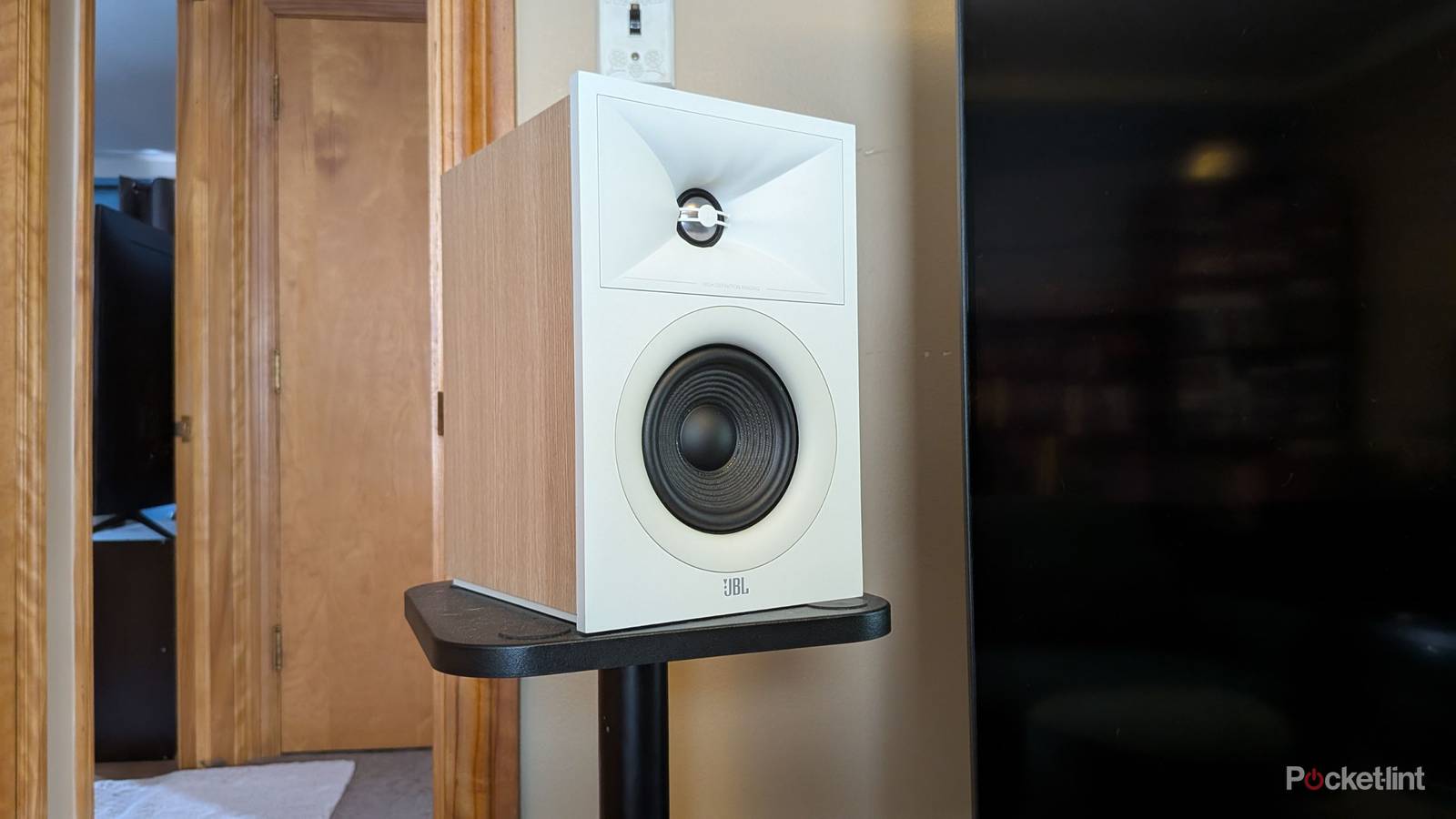
If you do start cheap, you can still maximize your experience and get better sound quality without having to break the bank. I see a lot of people with a turntable with bookshelf speakers on the same stand, and that’s something you should avoid. If you think about it, you might be able to think of a few reasons why that’s not a good thing. The big one is vibrations. Bookshelf speakers vibrate when sound is coming out of them, and that means the table they’re on will do the same. This could cause some issues with a spinning record, and that’s why common advice is to pick up speaker stands for your speakers.
This is a problem for home theaters as well. If your speakers are on the same shelf as each other, you should move them as soon as you can. Fortunately, speaker stands don’t cost a ton, and you can find them for about $50.
Get your speakers on some stands
Upgrade your setup for cheap

Aside from the vibrations that can distort sound, there are many other reasons to use speaker stands. A big one for me is that it gives you a lot more versatility in where you place your speakers. Instead of being tethered to an entertainment stand, you can place the stands wherever you’d like, and as long as you have enough speaker wire, you can get them into the perfect spot. I like having flexibility instead of being stuck in one spot. This is also how you can absolutely guarantee proper spacing between speakers.
Stands also let you get the speakers to ear level, which is actually great news for people who want the most out of their sound. I have an Ikea Besta as my entertainment stand, so it’s very low to the ground. If I were to place my speakers on it, the tweeters would be aimed more at my knees than at my ears. You’d still be able to hear everything, but it’s less than ideal if that’s how you’re listening.
 Quiz
QuizHome theater systems
Trivia challenge
From surround sound to 4K projectors — how well do you really know your home cinema setup?
AudioDisplayFormatsHardwareHistory
What does the ‘1’ refer to in a 5.1 surround sound system?
Correct! The ‘.1’ in any surround sound configuration refers to a dedicated low-frequency effects (LFE) channel, which is typically handled by a subwoofer. This channel carries bass-heavy sounds like explosions and deep musical tones, adding physical impact to your listening experience.
Not quite. The ‘.1’ refers to the dedicated low-frequency effects (LFE) channel, handled by a subwoofer. The ‘5’ counts the full-range speakers — typically front left, front right, center, and two surrounds — while the subwoofer handles the deep bass on its own separate channel.
What is the native resolution of a Full HD (1080p) display?
Correct! Full HD, commonly known as 1080p, has a native resolution of 1920 x 1080 pixels. It became the standard for HDTVs in the mid-2000s and remains widely used today, even as 4K (3840 x 2160) becomes more mainstream in home theater setups.
Not quite. Full HD (1080p) has a resolution of 1920 x 1080 pixels. You might be thinking of 2K cinema (2048 x 1080), which is slightly wider, or 4K (3840 x 2160), which is four times the resolution of 1080p and increasingly common in modern home theater displays.
Which audio format was developed by Dolby Laboratories and introduced with Blu-ray as a lossless surround sound option?
Correct! Dolby TrueHD is a lossless audio codec introduced alongside the Blu-ray format, capable of carrying up to 14 discrete audio channels. It is the codec underlying Dolby Atmos on Blu-ray discs and delivers studio-master-quality sound to home theater enthusiasts.
Not quite. The answer is Dolby TrueHD, a lossless codec introduced with Blu-ray that can carry up to 14 channels of audio at full master-quality fidelity. Dolby Digital is an older lossy format from the DVD era, while Dolby Digital Plus is an enhanced but still lossy codec used for streaming services.
What is the primary function of an AV receiver in a home theater system?
Correct! An AV receiver is the hub of a home theater system, responsible for decoding audio formats like Dolby Atmos and DTS:X, then amplifying those signals to power connected speakers. It also handles video switching, allowing multiple source devices to route through a single HDMI connection to your display.
Not quite. An AV receiver’s primary role is to decode multi-channel audio formats and amplify the signal to drive your speakers. While many modern receivers include video processing features like upscaling, their core purpose has always been audio decoding and amplification — making them essential for true surround sound setups.
In what decade was Dolby Surround — the first consumer surround sound format — introduced to home video?
Correct! Dolby Surround made its way into home video in the 1980s, first appearing on VHS and LaserDisc releases. It was a matrix-encoded format derived from Dolby Stereo used in cinemas, and it laid the groundwork for the more sophisticated discrete surround sound formats that followed in the 1990s.
Not quite. Dolby Surround arrived in homes during the 1980s, encoded into VHS tapes and LaserDiscs. While the technology had cinema roots in the 1970s, it wasn’t until the 1980s that consumer home video hardware began to support it, kicking off the era of home theater surround sound.
What does HDR stand for in the context of modern home theater displays?
Correct! HDR stands for High Dynamic Range, and it refers to a display’s ability to reproduce a wider range of brightness levels — from deep blacks to very bright highlights — as well as a broader color gamut. Formats like HDR10, Dolby Vision, and HLG are all HDR standards used in home theater TVs and projectors.
Not quite. HDR stands for High Dynamic Range. It’s a display technology that dramatically expands the contrast ratio and color range of a picture, making bright highlights more dazzling and shadows more detailed. Common HDR standards you’ll see on home theater equipment include HDR10, Dolby Vision, and HDR10+.
Dolby Atmos introduced a fundamentally new concept to surround sound mixing. What was it?
Correct! Dolby Atmos revolutionized surround sound by introducing object-based audio. Instead of assigning sounds to fixed speaker channels, sound designers can place audio objects anywhere in a three-dimensional space, including overhead. The system then renders those objects dynamically based on whatever speaker configuration you have at home.
Not quite. Dolby Atmos introduced object-based audio, which was a major departure from traditional channel-based surround sound. Rather than mixing sounds into set channels like ‘left surround’ or ‘center’, mixers place audio objects in 3D space and the Atmos renderer figures out the best way to reproduce them through your specific speaker layout, including height channels.
Which physical disc format won the high-definition home video format war in 2008, defeating its main rival?
Correct! Blu-ray, backed by Sony and a broad coalition of studios and manufacturers, defeated HD DVD — championed primarily by Toshiba and Microsoft — in early 2008. The turning point came when Warner Bros. announced it would go Blu-ray exclusive, prompting several major retailers and studios to follow suit, effectively ending the format war.
Not quite. Blu-ray won the high-definition format war in 2008. The conflict between Blu-ray and HD DVD had raged for roughly two years, but Warner Bros.’ decision to go exclusively Blu-ray in January 2008 proved decisive. Toshiba officially discontinued HD DVD shortly after, leaving Blu-ray as the standard for high-definition physical media.
Your Score
/ 8
Thanks for playing!
What’s nice about speaker stands is that they don’t break the bank at all. There are all types of stands out there, and I only spent $50 on the MOUNTUP speaker stands that I use. There are far more options available than that, but the point is that this is a relatively inexpensive upgrade that can give you a big boost in sound. The difference will be a lot smaller if you have already maximized your space, but if you have your speakers too low or too high, getting proper stands at proper heights will make a big difference. I wouldn’t say it’s going to be the same thing as adding Dolby Atmos speakers or something like that, but you should notice a shift. If you aren’t happy with your sound quality, don’t rush out and get new speakers — get stands first.
There’s a lot that goes into setting up your home theater, so I forgive you if you forget to pick up a pair of speaker stands. I was using a pair of side tables to hold my speakers for years, and they weren’t even the same height as each other. Desperate times call for desperate measures, as the saying goes. I eventually solved that problem, and I haven’t looked back.
Another budget-friendly upgrade is room correction
Don’t forget to do this

If you have a decent receiver, you have some some of room correction software that comes included with it. My Denon S760H has Audyssey, and that means I have to use a microphone and move it to different listening areas as my receiver calibrates my speakers to those positions. It’s a very important step because it’ll make sure everything sounds as good as it can for everybody listening to the sound coming out of your speakers.
I bring this up because it’s something you should do if you move your speakers at any point. This means that even if you ran your software when you first got your speakers, you should run it again if you moved your speakers to stands. This is important because your speakers have completely changed positions, and it means that the volume they were at before will no longer be the volume they should be at now. I’ve done this several times, and I would highly recommend it to anybody looking to change their setup. Even if the speakers move just a couple of inches over, it’s worth running the software again.
Sure, it’s an inconvenience to have to dig out the microphone that you haven’t used in years, but the entire process just takes a few minutes, and then you can toss it back into the closet. Don’t put it too deep into the closet, however, because if you’re like me, you’ll keep on making small tweaks.
What a lot of people don’t know about audio quality is that the job simply isn’t done once you get your speakers. There’s a lot you have to do after that to dial in the best experience you can get. Placement is very important for speakers, just as it is with other things. Think about your TV for a second. You wouldn’t want to place it opposite a window if there’s a massive glare shining on it, would you? If that’s your only choice, you’d probably get a set of blackout curtains to fight it. Apply that same level of thinking to your speakers. There’s no point putting them on a cluttered table where the sound could bounce off a bunch of different objects if you don’t have to.
It’s easy to avoid things like this as long as you’re mindful of where you set things up. Of course, a lot of this is trial and error, and I don’t expect people to know every in and out when they are first getting started. I didn’t know about speaker stands when I first bought speakers, but now I can’t imagine living without them. They really do make a big difference. If you’re looking for some budget-friendly upgrades to make to your sound system, I’d start with a decent set of speaker stands if you don’t already have them. They aren’t an eyesore, and if you get one that lets you run the wire through the stand itself, you don’t even have to worry about extra wires everywhere.