Around the end of last year, I upgraded to an LG C5 OLED TV and decided to try something I’d never done before, despite being a PC gamer for most of my life: connecting my PC to my TV. Before I got the LG C5, I was using an older Samsung LCD TV, and the idea had never really seriously crossed my mind to hook up my PC to it. I was perfectly happy gaming on my monitor and didn’t see much reason to change.
But after upgrading to the LG C5 — with its OLED panel, G-SYNC support, and 120Hz refresh rate — I figured it was finally time to see what PC gaming on a TV was all about. To my surprise, the experience far exceeded my expectations. Arguably, gaming in 4K looks so much better on a TV than on a monitor, and many single-player games feel way more immersive. Plus, thanks to technologies like DLSS, FSR, and frame generation, 4K gaming is much more achievable these days, even if you don’t have a top-tier GPU.
The biggest challenge, however, was controlling my PC from the couch. My desk, where my PC sits, is a short distance from my TV and connected via a 16-foot HDMI cable. For gaming, I mostly relied on an Xbox controller, which worked well enough. But one of the best things about having a PC connected to your TV is that it’s useful for far more than gaming. Whether I’m browsing the web, watching YouTube, or streaming movies and shows, having access to my PC from the comfort of my couch is incredibly convenient.
At first, I considered buying a wireless keyboard with a built-in trackpad so I could use my PC with my TV when I wasn’t gaming. Then Valve announced it was finally putting its new Steam Controller on sale, and I immediately knew I wanted to get my hands on one. Now, after finally getting it and using it for the past couple of weeks, I’ve come to the conclusion that it’s not just the best controller I’ve ever used for gaming, but it’s also an amazing TV remote.
The Steam Controller has what no other controller has
The trackpads are the stars of the show

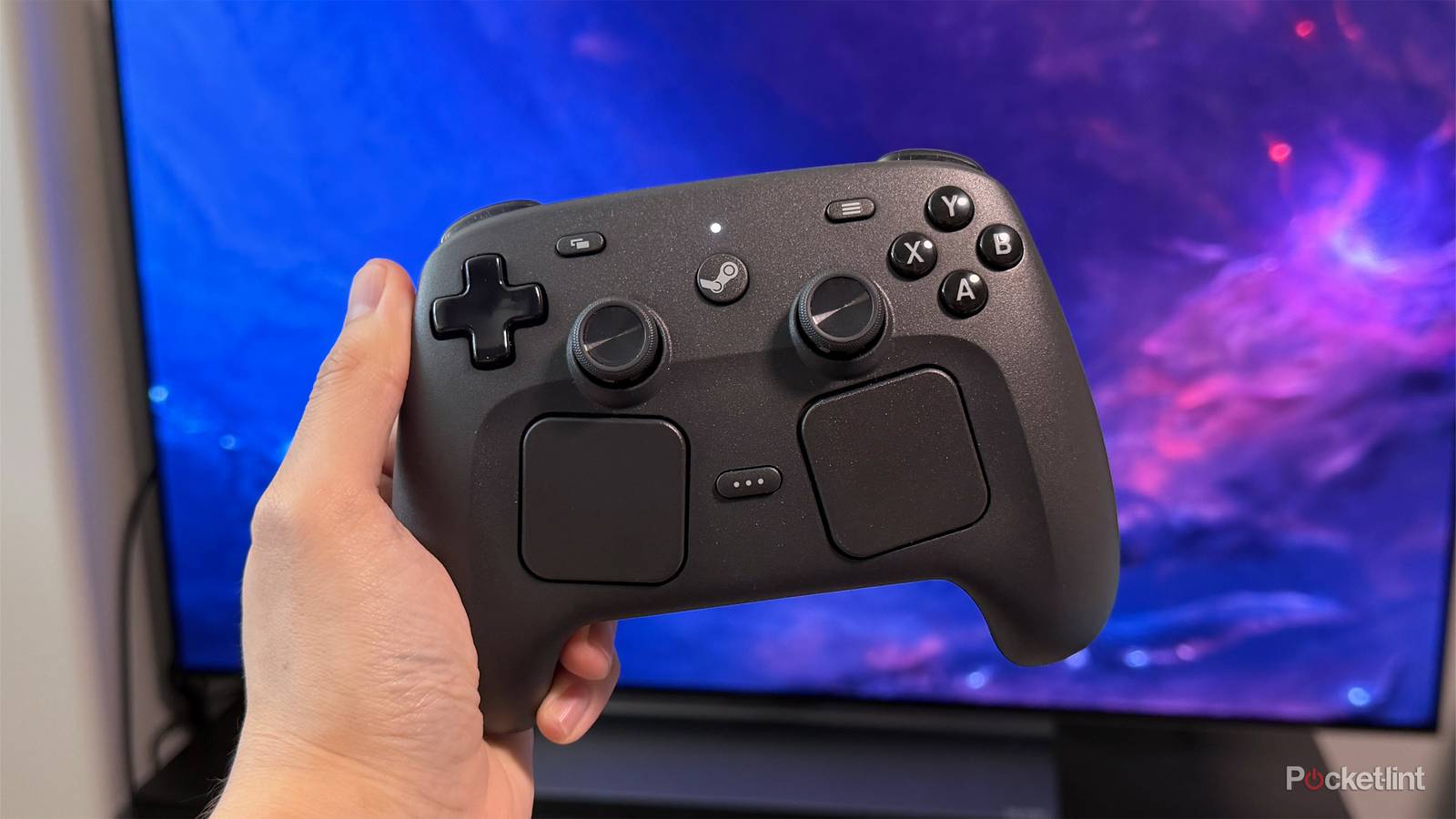
Since the Steam Controller isn’t exactly your typical controller, the first thing you’ll probably notice is the pair of square trackpads sitting beneath the joysticks. At first glance, they look like they might get in the way or make the controller feel awkward to use, especially for gaming. But in practice, Valve’s design works surprisingly well. In my experience, the trackpads have never gotten in the way, and I was actually surprised by how comfortable the controller feels in my hands, despite being larger than both an Xbox controller and a PS5 DualSense.
While the trackpads can be used in games, I’ve found their best use is when I’m using my PC for everything other than gaming. They effectively turn the Steam Controller into a mouse, giving me the precision I need to navigate Windows, drag Chrome tabs over to my TV, browse websites, and interact with apps from the couch. The trackpads feature haptic feedback and touch sensors, so the controller can tell when you’re moving the cursor and when you’re trying to click something, making the whole experience feel surprisingly natural.
Even better, you don’t need to spend time setting any of this up. It just works. As soon as I plugged the Steam Controller into my PC, Steam downloaded all the necessary drivers, and Windows immediately recognized it as both a gamepad and a mouse. It was a true plug-and-play experience.

As a result, I can now do far more than just game on my TV with the Steam Controller. I can browse the web, watch YouTube videos, queue up music, and navigate my PC entirely from the couch using the trackpads. And whenever I need to type something, I simply open the on-screen keyboard I’ve pinned to my taskbar and enter what I need without ever getting up.
Another feature I’ve really come to appreciate is the dedicated Steam button in the middle of the controller. Pressing it instantly launches Steam Big Picture Mode, which can be configured to automatically open on your TV by going to Settings > Display > Preferred Display within Big Picture Mode. That makes it incredibly easy to launch my Steam games on my TV instead of having them open automatically on my main monitor at my desk.
I’ve also had zero latency issues. The Steam Controller connects to PCs using a 2.4GHz wireless transmitter that doubles as a charging puck, and it’s easily one of the most responsive wireless controllers I’ve ever used.
The problem with the Steam Controller is availability
You’ll need to be patient if you want one

If you’re interested in getting a Steam Controller for your PC, whether you plan to use it at your desk or from the couch, you’ll need to be patient. Valve has warned that demand for the controller has “exceeded expectations.”
When the Steam Controller first went on sale in May, it sold out almost instantly. In response, Valve introduced a reservation system that lets anyone interested reserve their place in line and purchase the controller on a first-come, first-served basis when more stock becomes available.
You can reserve one now through the Steam store page, and Valve has recently added estimated delivery windows to the reservation process, giving you a better idea of when to expect your controller. Once it’s your turn to buy, Valve will email you, and you’ll have 72 hours to complete your purchase before your reservation expires.
However, if you make a reservation today, be prepared for a wait. Valve currently estimates that new reservations may not ship until late 2026, with some potentially slipping into early 2027.
“We have no plans to stop making Steam Controller. But as we look at the current demand compared to how many we know we can make by the end of the year, we want to manage expectations as much as we can with regards to when folks can expect to receive their order,” Valve said in a recent blog post.
Ultimately, if you’re interested in getting a Steam Controller, whether it’s purely for gaming or to use with your TV as I have, I think it’s well worth the wait. After spending the last week with it, it’s easily one of the best $100 purchases I’ve made in a long time, and it’s made using my PC with my TV far more enjoyable.

- Platform
-
Steam
- Battery
-
Up to 35 hours
- Connectivity
-
USB-C Steam Controller Puck or Bluetooth
- Colors
-
Black
- Price
-
$100