The NEEWER F700 Field Monitor is a high-quality monitor that would excel at video, macro, fashion, studio, and commercial photography, as well as landscape. How useful would it be for night photography?

NEEWER contacted me about reviewing this monitor. I mostly do night photography and do not do the other kinds of photography or video mentioned above, and mentioned this to them. However, they were okay with me reviewing it primarily for night photography. Consequently, this will likely be a very different kind of review than most.

Note: NEEWER sent us the F700 Field Monitor with two NP-F750 batteries to review and keep. However, this is an independent review, and all thoughts about this product are our own.
Pros
- Very bright 2000-nit display, which is highly beneficial for day use outdoors
- Mounts on a camera rig, tripod, or cage with 1/4″ screws and a cold-shoe mount included
- Helps expose and focus accurately, especially beneficial for video applications
- Includes 15 built-in 3D LUTs you can easily toggle to preview different looks straight away
- You can import your own 3D LUT files via an SD card, giving you flexibility to preview custom or camera-specific looks
- Various cables included
Cons
- Relatively light plastic build that might not hold up to rigorous or constant use
- Battery life could be longer when used at or near maximum brightness, even with two batteries, and the monitor slowly drains power when batteries are attached but not in use
NEEWER F700 Field Monitor — Technical Specifications

All technical specifications for the NEEWER F700 Field Monitor are from the official NEEWER website.
Specifications
- Model: F700
- Resolution: 1920×1080 pixels
- Dot Pitch: 0.0804(H)x0.0804(W)(mm)
- Aspect Ratio: 16:9
- Brightness: 2000 nit ±10% (actual measured brightness)
- Contrast Ratio: 1000:1
- Viewing Angle: >160°H/160°V; 80°/80°(L/R) 80°/80°(U/D)
- Input: HDMI
- Output: HDMI, 3.5mm headphone jack
- Power Input/Output:
5.5mm DC Input Interface: DC- 12-26V (cannot be used as a dummy battery when in low voltage output)
2.5mm DC Output Interface: DC 8.4V (can connect a dummy battery power cord to the camera via the DC power output interface, significantly extending the camera’s battery life) - Type C Input Interface: Supports 5V/3A and higher fast chargers or portable chargers (3A output)
- HDMI Input Format Support: 480i, 576i, 480p, 576p, 720p (60/59.94/50/30/29.97/25/24/23.98), 1080i (60/59.94/50), 1080p (60/59.94/50/30/29.97/25/24/24SF/23.98/23.98sF), 3840×2160 (30/25/24Hz), 4096×2160 (25/24Hz)
- Total Power Consumption: ≤22W (without DC 8.4V output)
- Operating Temperature: -20°C-55°C
- Storage Temperature: -30°C-65°C
- Dimensions: 6.9″x4.2″x1″/175x107x25mm
- Weight: 15.7oz/445g (without batteries); 23.1oz/654g (with 1 battery); 30.2oz/857g (with 2 batteries)
Package Contents
F700
- 1 x Monitor
- 1 x Monitor Mount
- 1 x USB to Type C Charging Cable
- 1 x HDMI to HDMI Cable
- 1 x HDMI to Micro HDMI Cable
- 1 x HDMI to Mini HDMI Cable
F700+ 2*NP-F750 Battery
- 1 x Monitor
- 1 x Monitor Mount
- 2 x NP-F750 Battery(4400mAh)
- 2 x USB to Type C Charging Cable
- 1 x HDMI to HDMI Cable
- 1 x HDMI to Micro-HDMI Cable
- 1 x HDMI to Mini-HDMI Cable
I was reviewing this primarily for field use in night photography to see how it would help with focusing. With or without focus peaking, would this 7″ screen make it far easier to nail stars, distant lights, or foreground edges than a tiny camera LCD? Would it be practical to bring into a bag and set up in the dark?
NEEWER F700 Field Monitor — Ergonomics and Build Quality

The ergonomics were about what you might expect since it’s a monitor. The buttons are easy to find and push in normal daylight. The included hot shoe adapter was easy to use. I was able to tilt the monitor up to 180 degrees.

Build Quality
The F700 Field Monitor is an entry-level field monitor, although it does support custom LUTs, which helps separate it from other entry-level monitors near its price point. However, you cannot expect the F700’s build quality to match that of higher-end professional monitors costing several times more—and it doesn’t. It has a plastic feel. Although I was not about to do a Photofocus Bounce and Drop Test, I would not want to drop this from several feet onto a hard floor. However, I would be willing to test it in the field.
NEEWER F700 Field Monitor — In the Field

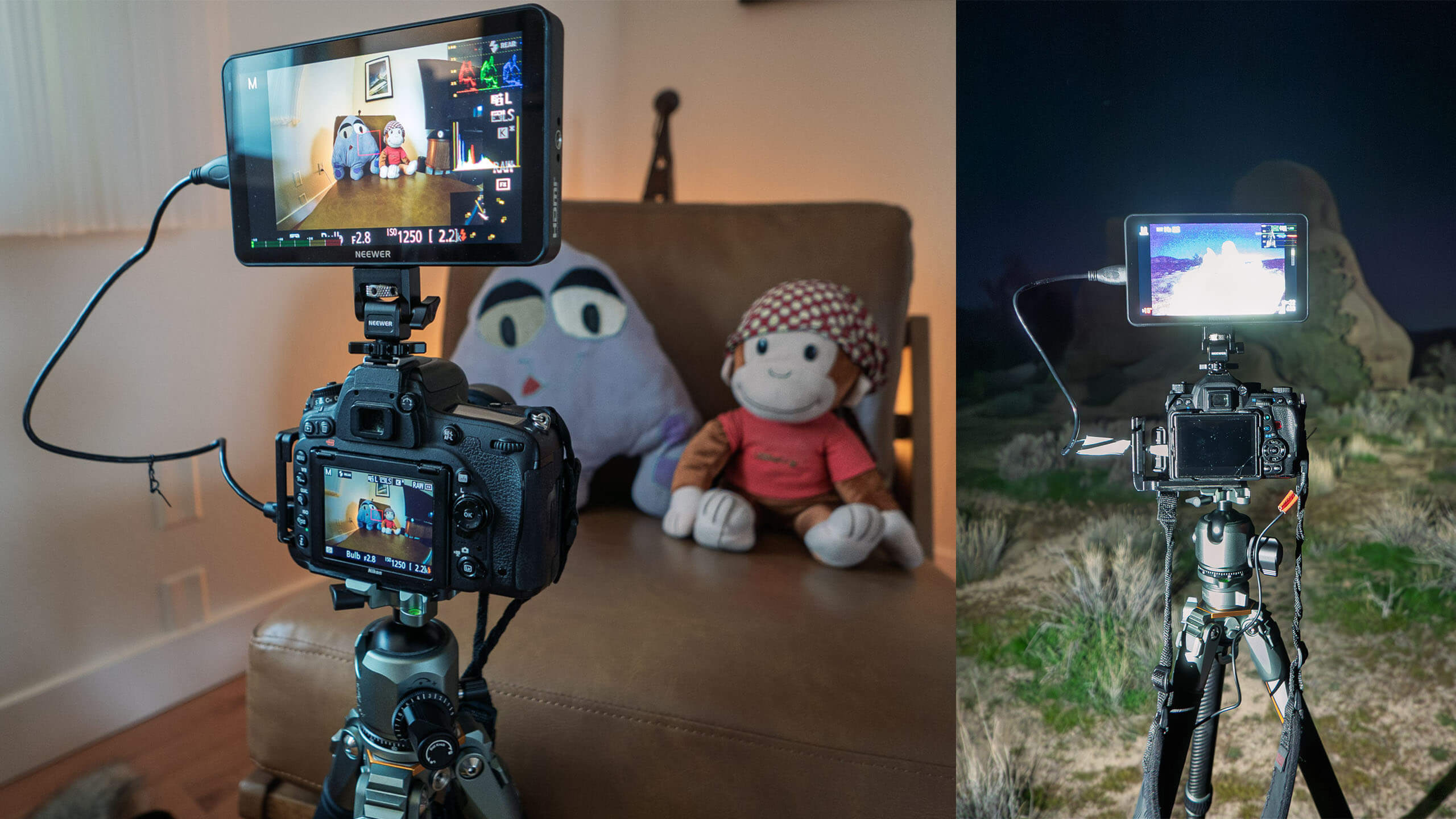
The first test was to manually focus the camera on a couple of stuffed animals in a dimly lit room. I was able to set up everything with ease and focus on the animals. There was no noticeable lag between the camera and the monitor, and the colors were rendered quite well.
Next, I tested the monitor in dusty Joshua Tree National Park on a moonlit evening. With night photography, it’s not always easy to see what you’re doing on the much smaller camera LCD. Especially since I began wearing glasses for nearsightedness, I’ve had to take them off to see the LCD better. Would the field monitor help me nail focus on stars, distant lights, or foregrounds? Would it make the composition process easier?
In a word, yes. Focusing on virtually anything—stars, foreground subjects, textured rocks, Joshua Trees, etc.—was considerably easier. And I was able to easily see what the camera saw, making composition much easier. I could also see potentially distracting elements on the periphery far more easily. It felt luxurious, as if I were being pampered.
However…
Bright, bright, bright…
The field monitor is bright. For most people, this would be a bonus—you can see everything even in broad daylight, which was certainly the case when testing it around my house.
At night, however, even when dimmed as low as it will go, it’s still bright. And this was during a nearly full moon. On a dark night photographing the Milky Way, this would be distractingly bright.
Most night photographers dim their LCD screens heavily. But even then, this would be too bright for most applications. For night use, there are limited scenarios in which this would work well, which we’ll discuss below.

NEEWER F700 Field Monitor — “useful for night photography and more”

For night use, the best applications would be:
- Indoors at night (abandoned buildings, warehouses, low-light product or car photography)
- Photographing alone
- City night portrait sessions
- Teaching night photography workshops where you want to show camera adjustments, framing, and settings

As mentioned, I felt almost pampered when focusing and composing. It felt like the difference between watching a video on a smartphone and switching to a computer monitor.
It was also easy to set up at night while the camera was on a tripod. The most challenging part was fitting the HDMI cable into the Pentax K-1 with the L-bracket attached. This was more an L-bracket issue than a monitor issue.
Other Uses
A field monitor like this would be extremely useful for macro photography, which I do occasionally. Making minute focal adjustments with a 7″ screen is significantly easier. Combined with the touchscreen, it would streamline macro work immeasurably.
I mentioned indoor low-light product or car photography as well. Although I did not have the opportunity to test it in those contexts, I’ve done both in the past and can easily imagine it helping substantially.
I can also see the monitor being useful for video, fashion photography, portraits, studio work, landscape, or any scenario in which several people need to evaluate images.
At this price point, it would be useful to have one or two of these for any of these scenarios.