


If you cast your mind back to the mid-2000s era of DVD home video, you might remember one quirky-yet-iconic part of the experience that has hardly survived into the modern day: menu selection screens. Indeed, the vast majority of movies and TV shows that released on disc during this era shipped with funky, bespoke menus with flashy animations, custom designs, and a variety of other bells and whistles.
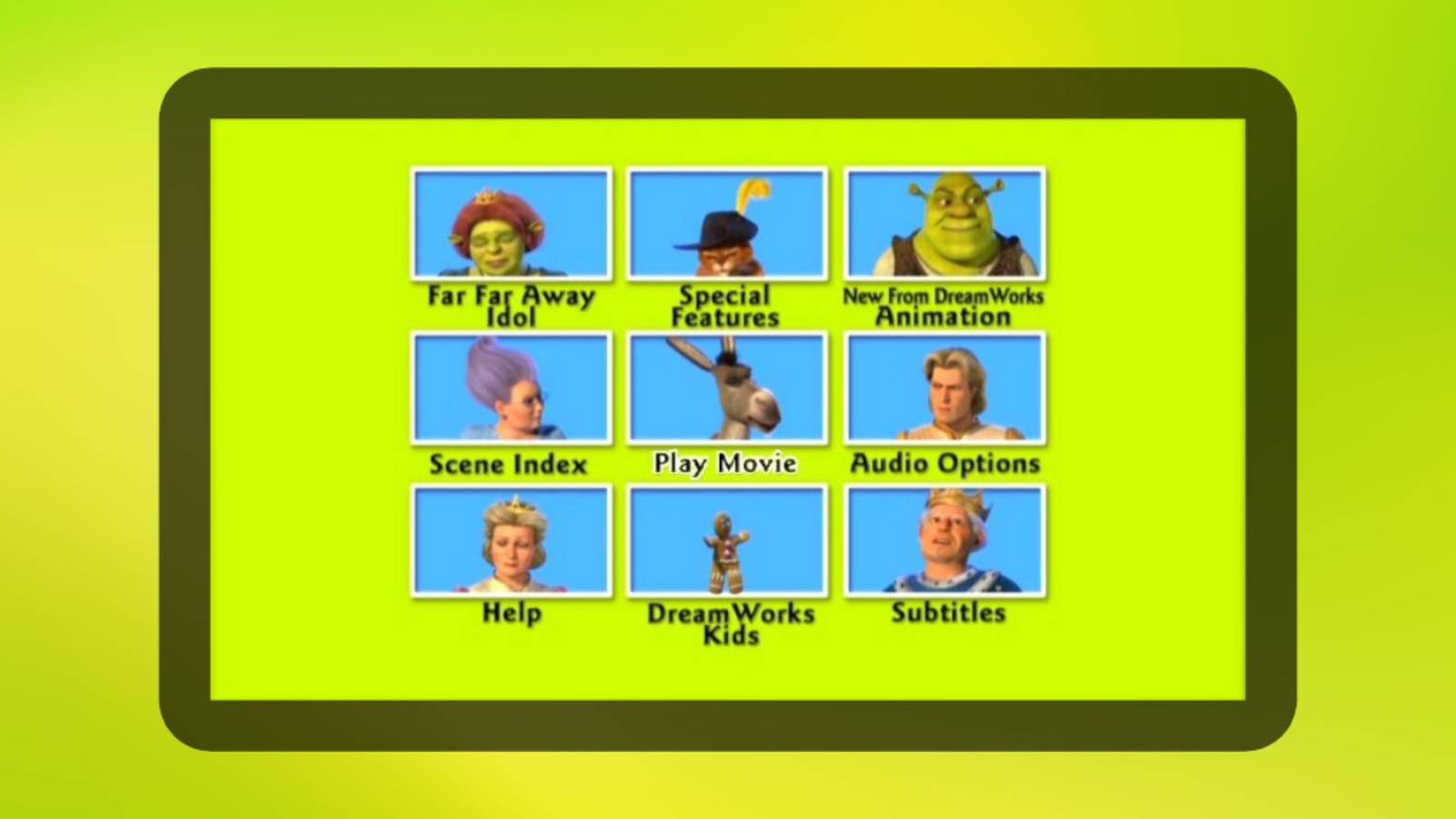
Take, for example, 2004’s Shrek 2. In its home video release, the film features a dedicated screen with options to not only play back the main video content itself, but also special features, a scene index, a subtitles subsection, audio options, a help interface, an area to learn about new releases from DreamWorks Animation, the Far Far Away Idol bonus content short, and even a DreamWorks Kids section.
Each Shrek 2 menu option is given its own corresponding icon that showcases one of the main characters of the movie, and tapping into each entry reveals its own unique screen with a fanciful font, selection, cursor, color pallet, and still image. Put together, the experience is polished and evokes an appropriate sense of in-universe whimsy.
Everything is sterile these days
It’s time to bring joy back into the media experience

To be clear, plenty of modern-day Blu-ray and DVD releases still offer a basic menu screen interface, but these newer incarnations are far simpler on the whole. They often only include basic play and scene selection buttons against a still image ripped from the movie or show itself, without any of the love or attention characteristic of classic-era menu screens.
Luckily, it’s still possible to look back and marvel at the vast ecosystem of legacy DVD menu screens in 2026. There are several internet archives available that showcase this particular part of physical media’s history, preserving the experience for future audiences to enjoy. Personally, I’m a big fan of the DVD Menus website, which chronicles just about every DVD menu imaginable across its massive database.
…I’m struck by just how diverse and fantastical so many older menus are when compared to their modern counterparts.
Perusing through the DVD Menus site, I’m struck by just how diverse and fantastical so many older menus are when compared to their modern counterparts. It brings me back to an era in which physical media was purposefully designed to instill joy, as opposed to the clinical, corporate look and feel of today’s software and services.
With internet-based streaming platforms owning much of the modern content consumption market, it’s not surprising to see less care and attention to detail being placed on something like a disc menu screen. Fewer users are likely to ever even see — let alone appreciate — menu screens in a digital-first world, but that doesn’t mean they aren’t worth including. Physical media is undeniably making a comeback of its own, and I’d love to see well-designed menu screens follow suit.
 Quiz
QuizBlu-ray and DVD technology
Trivia challenge
From spinning discs to high-definition glory — how much do you really know about Blu-ray and DVD?
HistoryHardwareFormatsCapacityStandards
In what year was the DVD format officially launched for consumer use?
That’s right! DVD was officially launched in Japan in November 1996, before rolling out to North America in 1997. The format was developed by a consortium of major electronics companies including Sony, Panasonic, and Philips.
Not quite — DVD launched in Japan in November 1996. It then made its way to North American markets in 1997, quickly displacing VHS as the dominant home video format over the following years.
What colour laser does a standard Blu-ray player use to read discs?
Correct! Blu-ray players use a blue-violet laser with a wavelength of 405nm. This shorter wavelength compared to the red laser used in DVDs allows data to be packed much more densely on the disc surface.
The answer is blue-violet, with a wavelength of 405nm. This is actually what gives Blu-ray its name. The shorter wavelength compared to the red laser in DVDs is what enables the significantly higher storage capacity.
What is the storage capacity of a standard single-layer Blu-ray disc?
Spot on! A single-layer Blu-ray disc holds 25GB of data. Dual-layer discs double that to 50GB, while newer BDXL triple-layer discs can hold up to 100GB, making them ideal for 4K Ultra HD content.
The correct answer is 25GB for a single-layer Blu-ray disc. Dual-layer discs hold 50GB, which is why most feature films are released on dual-layer media to accommodate high-bitrate video and lossless audio tracks.
Which format did Blu-ray defeat in the high-definition disc format war of the mid-2000s?
Exactly right! Blu-ray defeated HD DVD in a format war that concluded in early 2008. The turning point came when Warner Bros. announced it would exclusively support Blu-ray, prompting Toshiba to discontinue HD DVD shortly after.
The correct answer is HD DVD, backed primarily by Toshiba and Microsoft. The format war ended in February 2008 when Toshiba officially discontinued HD DVD after Warner Bros. threw its exclusive support behind Blu-ray.
What is the maximum video resolution supported by a standard Blu-ray disc (not Ultra HD)?
That’s correct! Standard Blu-ray supports up to 1080p (Full HD) resolution at up to 60 frames per second. It was a massive leap over DVD’s 480p standard definition, and helped drive widespread adoption of HD televisions.
Standard Blu-ray tops out at 1080p Full HD resolution. This was a significant upgrade over DVD’s 480p and helped establish the format as the premium home video choice — until 4K Ultra HD Blu-ray arrived to raise the bar again.
Which company originally developed the DVD format alongside JVC, Sony, and others?
Correct! Philips was one of the founding members of the DVD Consortium alongside Sony, Panasonic, Hitachi, JVC, and others. Philips had already co-developed the CD format with Sony, so its involvement in DVD was a natural progression.
The answer is Philips, which co-developed the DVD standard alongside Sony, Panasonic, JVC, and Hitachi among others. Philips had significant experience in optical disc technology, having previously co-invented the CD with Sony back in the early 1980s.
What laser wavelength does a standard DVD player use to read discs?
Well done! DVD players use a red laser with a wavelength of 650nm. This is shorter than the 780nm infrared laser used in CD players, allowing DVDs to store more data, but longer than Blu-ray’s 405nm laser which enables even denser storage.
DVD players use a 650nm red laser. For comparison, CD players use a 780nm infrared laser, while Blu-ray uses a 405nm blue-violet laser. The progression to shorter wavelengths is what has driven increases in optical disc storage capacity over the decades.
What does the acronym ‘BD-ROM’ stand for in Blu-ray terminology?
Correct! BD-ROM stands for Blu-ray Disc Read-Only Memory. It is the standard format used for commercially pressed Blu-ray movies and games, as opposed to BD-R (recordable) or BD-RE (rewritable) formats used for home recording.
BD-ROM stands for Blu-ray Disc Read-Only Memory. This is the pre-pressed, non-recordable format you find on commercial movie and game releases. The Blu-ray family also includes BD-R for write-once recording and BD-RE for rewritable discs.
Your Score
/ 8
Thanks for playing!