

When I was little, I used to despair at the idea that I’d never get to read every book ever written. A silly notion, yes, but that didn’t stop me from collecting dozens of stories and proudly displaying them in every room I’ve had. Even now, well into my adult years, I have books of every genre adorning shelves, stacked neatly under my bed, and even taking up residence in the trunk of my car. And that’s just the physical copies.
I’ve had three e-readers: a 2nd-gen Kindle (2009), a 7th-gen Kindle Paperwhite (2015), and a brand-new 12th-gen Kindle Paperwhite (2024). Synced across all of them are 400+ books I’ve bought in the last decade and a half, not including the hundreds of titles I’ve borrowed from Kindle Unlimited, Libby, and all the side-loaded fan fiction.
I know it’s futile, but I’m still on a mission to read as many books as I possibly can, and e-readers make it much easier to instantly access them. But that leaves me with an overwhelming number of choices, and sometimes I simply can’t decide which book to pick up. In a delightful experiment, I let my Kindle decide between the books in my TBR pile — here’s how.

- Brand
-
Amazon
- Screen
-
7-inch E-ink, 300ppi, 16-level gray scale
- Storage
-
16GB
- Connectivity
-
Bluetooth, Wi-Fi
Use a spinning wheel right on your Kindle
With a beloved E Ink-friendly site
You may have heard of ReKindle — the web-based dashboard made for E Ink devices, not just Kindles. ReKindle is open-source and especially useful on a device with a larger screen, like the Kindle Scribe. You can access it through your Kindle’s browser, and it lets you access apps like calendars, games, habit trackers, and more without any complicated jailbreaking methods. I use it quite often to play 2048.
The animation might not be as fluid as the LCD on your laptop, tablet, or phone, but the E Ink wheel is a neat way to pick out your next book without agonizing over plot lines and page numbers.
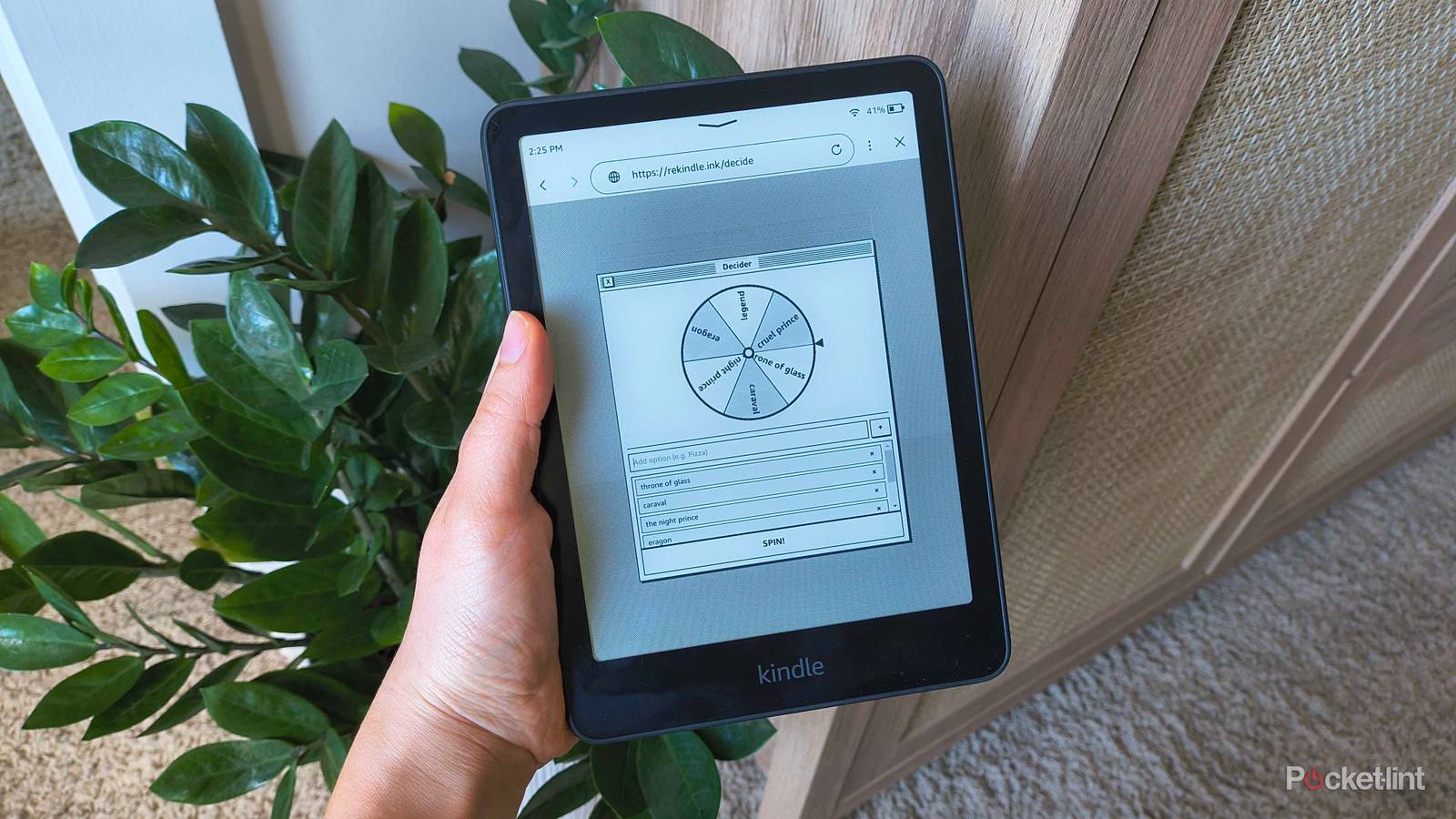
The website also has a variety of tools, like a calculator, converter, countdown clock, and — my favorite — a ‘Decider.’ The Decider is a spinning wheel with customizable pie slices, so you can type in the names of the books you’re stuck between and spin the wheel to pick one. Here’s how to get there on your own Kindle or e-reader:
-
From your Kindle’s home screen, tap the stoplight menu in the top-right corner.
- (For all other e-readers, enter the browser.)
- Choose Web Browser from the dropdown.
- In the search bar, type rekindle.ink.
- Under Tools, find the spinning wheel symbol with ‘Decide‘ beneath it and tap it.
- Remove the default options by clicking the ‘x‘ beside each.
- Type in new options in the suggestion bar and hit Enter to add each book from your TBR pile.
- To exit the keyboard, tap anywhere in the blank space.
- Tap Spin to see which book your Kindle chooses for you.
I don’t know how many you’re choosing between off the top of your head, but I tried adding upwards of 50 items to the wheel to test its limits, and ReKindle just let me keep going.
The animation might not be as fluid as the LCD on your laptop, tablet, or phone, but the E Ink wheel is a neat way to pick out your next book without agonizing over plot lines and page numbers.