


My Fire TV Stick 4K Max is the device I rely on most for streaming, so anytime there’s an easy way to improve the experience, I’m all in.
Recently, Amazon introduced a redesigned Fire TV user interface (UI) for the Fire TV Stick 4K Plus and 4K Max, and I’ve definitely noticed a clear difference. Not only is everything easier to navigate, but it also feels faster overall, with the update doing a solid job of improving performance.
But the Fire TV UI isn’t the only thing Amazon has recently upgraded. The company also quietly overhauled its Fire TV mobile app. It was mainly just a backup remote before, but with the latest update rolling out now, it’s been completely transformed. It now functions as a true second-screen experience, which, in my opinion, is actually worth using.

- Developer
-
Amazon
- Subscription cost
-
No
- Ads
-
No
The Fire TV app is way more useful now
Finding something to watch just got easier

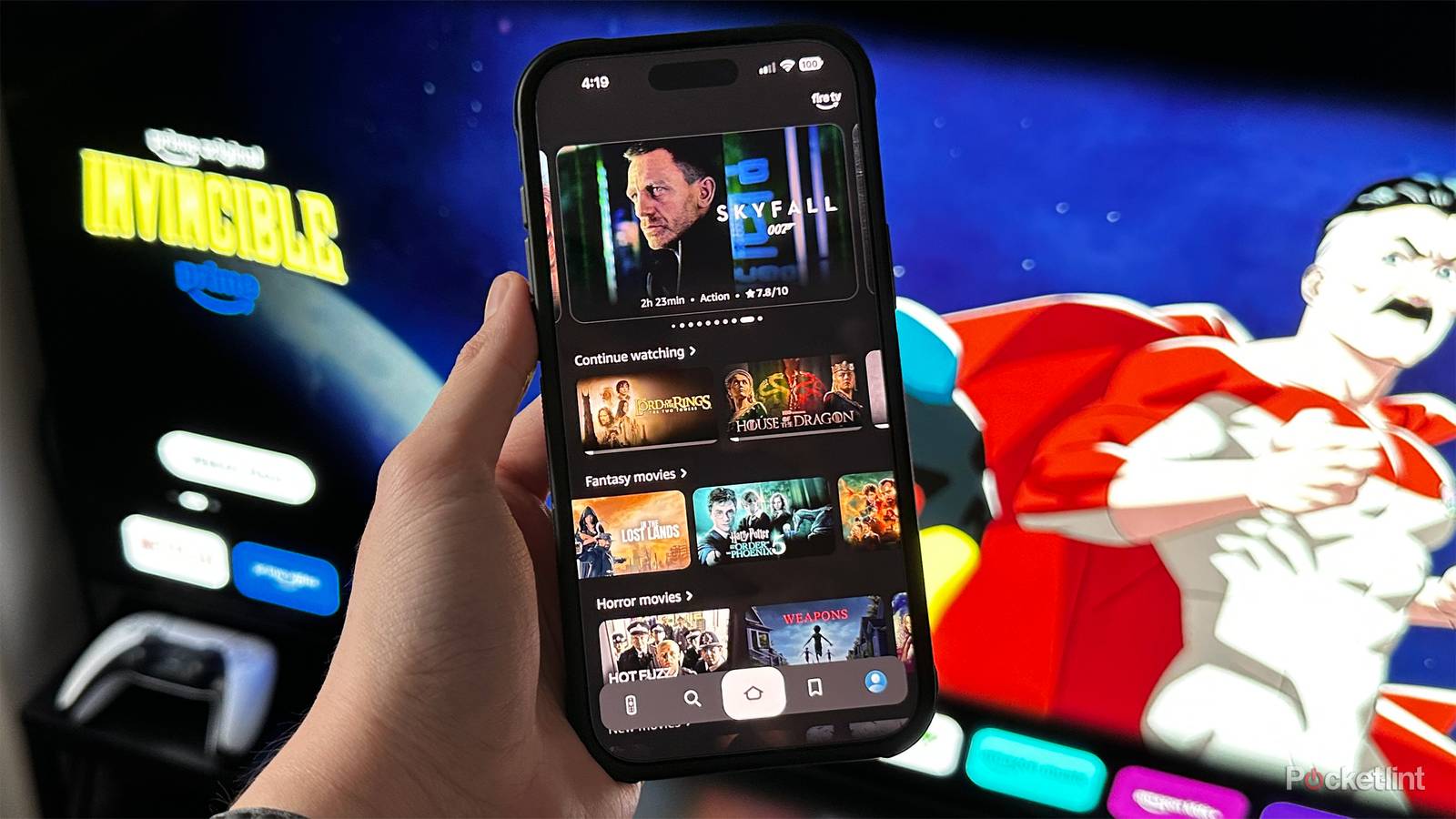
For starters, the biggest change Amazon has made to the Fire TV app is that you can now browse and search for movies and TV shows right from your phone. Instead of endlessly scrolling on your Fire TV with a remote, you can do it with a quick flick of your finger, which I’ve found is a lot faster when you’re trying to find something to watch. The new home screen in the app is basically a mini version of the Fire TV interface, complete with the same design features from Amazon’s recent UI refresh.
The new search function is another standout feature, and I’ve found it extremely useful when I want to find something specific fast. The other day, for example, I wanted to watch Raiders of the Lost Ark. Instead of grabbing my remote, I opened the Fire TV app, searched for it, found it in seconds, and then tapped “View on my Fire TV.” It instantly pulled it up on my Fire TV Stick 4K Max and showed me exactly where it was available to stream.

Another solid addition is that your watchlist is now built into the app as well. So if you’ve got a long list of shows and movies to get through like I do, you can open it on your phone and queue things up on your Fire Stick without digging through any menus on your TV. You can also add new titles directly from the app, which is perfect for when you come across something while you’re away from your TV and don’t want to forget about it later.
Now, to be fair, none of these features are revolutionary. Roku’s mobile app has offered many of the same features for a while now, so if anything, Amazon was way behind on adding these. Still, it’s better late than never, and I’m glad to see Amazon finally make the Fire TV app way more useful, especially after years of it just being a backup remote.
And speaking of that backup remote functionality, it’s mostly unchanged with this update. That’s not a bad thing, though, as it works perfectly fine, and is an easy way to control your Fire Stick with your phone instead of using the remote that came with it.
The new Fire TV mobile app is rolling out now
It’s free to download

If you’re interested in trying out the redesigned Fire TV app, the update is rolling out now on both Android and iOS in the US, Canada, Brazil, Mexico, the UK, Germany, France, Italy, Spain, Japan, and India. The app is completely free to download.
The new Fire TV UI, on the other hand, is currently only available in the US on the Fire TV Stick 4K Plus and 4K Max. Amazon says it plans to roll out the new UI to more countries and devices in the spring, so hopefully, there won’t be much longer of a wait for more people to try it out.