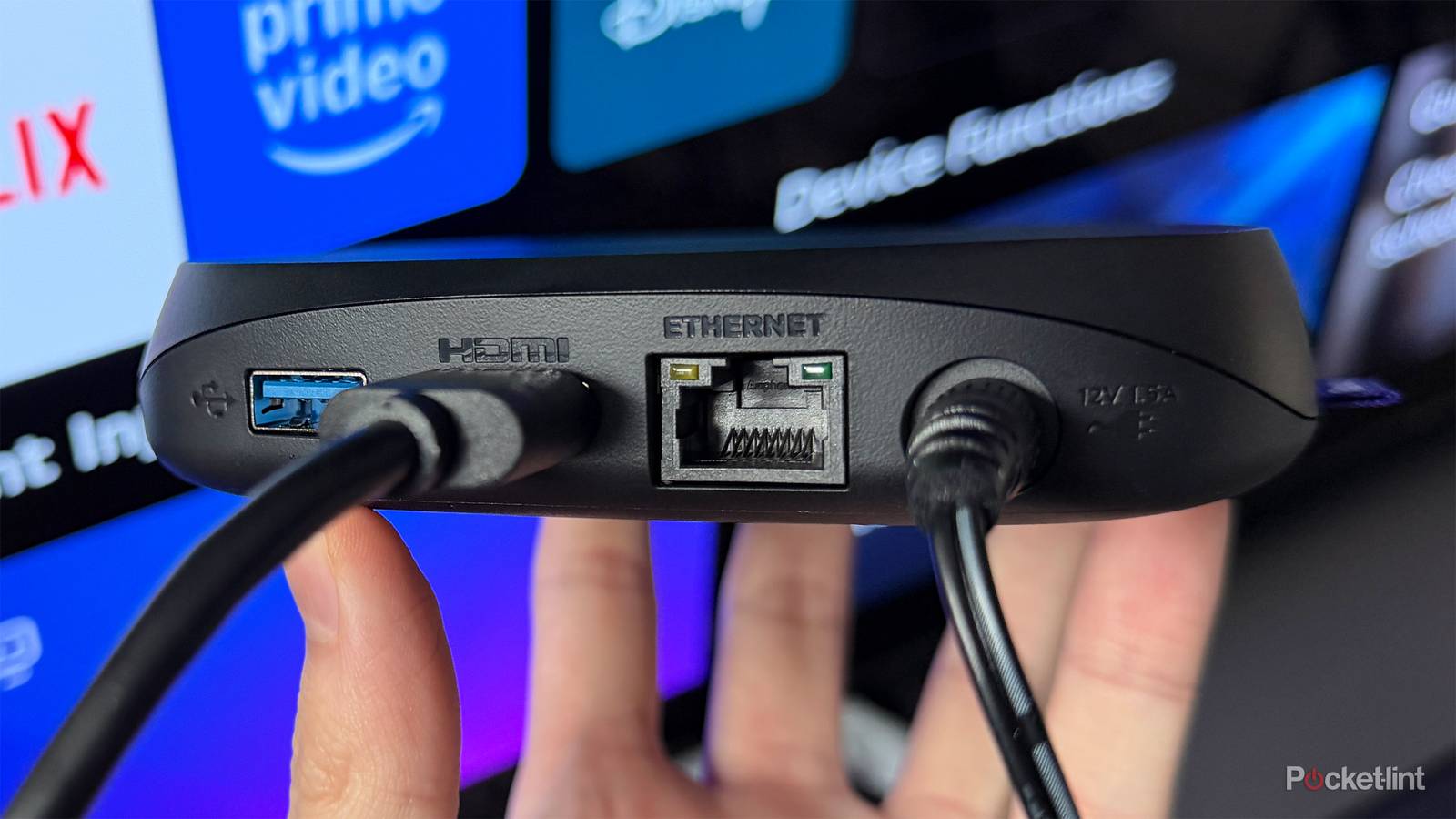
There are a few advantages to going with a streaming box instead of a streaming stick. Usually, it comes down to better hardware, more features, and one key thing that streaming sticks often don’t have: ports.
And by ports, I mean things like a USB port for connecting a hard drive or USB stick to watch your own media, or an Ethernet port so you can plug your streamer directly into your router for a more reliable internet connection and faster speeds.
But here’s a myth I want to clear up, especially when it comes to Ethernet: the idea that it’s always faster than Wi-Fi, which isn’t necessarily true. Depending on the streaming box you have, the Ethernet port could actually be slower than its built-in Wi-Fi. Why? Because some companies cut corners and don’t equip their streamers with proper Ethernet ports.
So, if you want the fastest streaming setup possible, it’s important to check what type of Ethernet port a device has.
Not every streamer has fast Ethernet
10/100 Ethernet is a glaring limitation for many streamers and smart TVs

Similar to how HDMI ports work, not all Ethernet ports are created equal. Some are much faster than others, and not every streaming box has the same type of Ethernet port.
For example, streaming boxes like the Roku Ultra and the Fire TV Cube are equipped with 10/100 Ethernet ports. 10/100 Ethernet has been around for ages, and it means the Ethernet port is capped at a download speed of 100 Mbps, which is nowhere near as fast as a Gigabit Ethernet port, which caps out at 1 Gbps (1,000 Mbps).
This means that since the Roku Ultra has Wi-Fi 6 and the Fire TV Cube has Wi-Fi 6E, you can get faster download speeds over Wi-Fi than over Ethernet, assuming your internet plan is fast enough.
…while you may think you’re upgrading your smart TV with Ethernet, oftentimes you aren’t really changing anything.
For instance, on my Roku Ultra, I recently ran an internet speed test over Wi-Fi and got a download speed of 267 Mbps, which is more than double what its 10/100 Ethernet port, limited to 100 Mbps, can deliver.
It’s not just some streaming boxes that have this Ethernet limitation, either. The vast majority of smart TVs are also equipped with 10/100 Ethernet ports, and using Wi-Fi on them is often faster. So while you may think you’re upgrading your smart TV with Ethernet, oftentimes you aren’t really changing anything.
So, with all that in mind, the question is: how do you get the fastest streaming setup with Ethernet? And the answer lies with Gigabit Ethernet.
What streaming devices have Gigabit Ethernet?
Gigabit Ethernet has become easier to find

Thankfully, in recent years, streaming devices have increasingly adopted Gigabit Ethernet instead of the older 10/100 standard. Again, you won’t find these ports on tiny streaming sticks, but many full-sized streaming boxes now include Gigabit Ethernet, letting you take full advantage of faster, more reliable internet speeds.
One of my favorite streamers with a Gigabit Ethernet port is the Apple TV 4K. The base 64GB model doesn’t include Ethernet, but the 128GB version comes with a full Gigabit Ethernet port capable of 1 Gbps speeds. Even though the third-generation Apple TV 4K has been around for a few years, it remains one of the fastest streaming devices on the market thanks to its A15 Bionic chip — and if you’re already in the Apple ecosystem, the interface will feel instantly familiar.
For Android fans, the Google TV Streamer also comes with Gigabit Ethernet, making it a solid choice if you prefer the openness of Google TV over Apple’s tvOS. Another popular Android option is the Nvidia Shield TV Pro, which also includes a Gigabit port.
…for the fastest streaming experience with less buffering, no quality loss, and better performance in activities like cloud gaming and streaming from a personal media server, a device with a Gigabit Ethernet port is the best choice…
Of course, you can also use a console for streaming. Both the PS5 and Xbox Series X have Gigabit Ethernet ports, which can speed up streaming and improve your ability to download and play games.
On the flip side, if you plan to rely on Ethernet rather than Wi-Fi, you’ll want to avoid devices like the Fire TV Cube, Roku Ultra, or the Ethernet port built into most TVs, as they’re all limited to 10/100 Ethernet speeds.
Most streaming services recommend around 25 Mbps for 4K streaming, so a 10/100 Ethernet port at 100 Mbps can still get the job done if necessary. However, for the fastest streaming experience with less buffering, no quality loss, and better performance in activities like cloud gaming and streaming from a personal media server, a device with a Gigabit Ethernet port is the best choice and more future-proof.