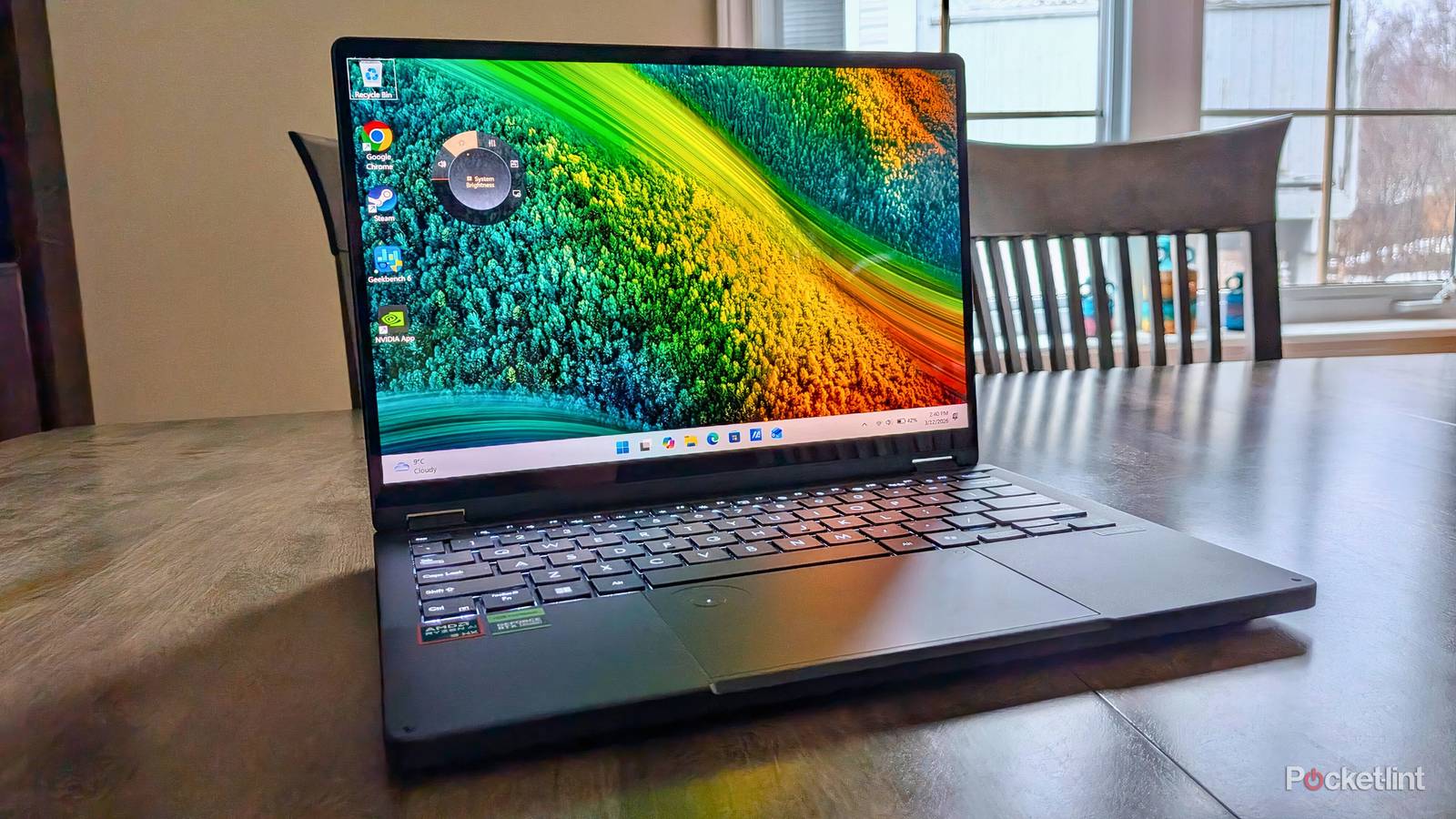
When it comes to laptop-style PCs, I’m particularly drawn to models promising to be capable of burning through seriously heavy work loads. In an era where even mid-range smartphones and tablets are powerful enough for general-purpose computing (while also being thin and light enough to carry around anywhere and everywhere), I think the traditional laptop form factor is at its absolute best when leveraged for all-in-one workstation purposes.
With more room under-the-hood for robust active cooling solutions, as well as more internal space available under the keyboard deck for a larger battery capacity and for brawnier components, a decked-out laptop is akin to a heavy-duty truck — one that wholeheartedly embraces ruggedness, dependability, and extensibility.
That being said, I can’t help but acknowledge the allure of Ultrabook-esque laptops, what with their svelte proportions and their barely-there footprints. The inherent sacrifice of going with a truck is that, well, you’re going with a truck, complete with the heft and footprint that comes along with all that extra might.
Have I finally found a Windows 11 notebook that lets me have my cake and eat it too?
That’s where Asus’ ProArt PX13 comes into play. As a laptop, the PX13 leans into its powerhouse potential with a mix of advanced cooling, a high-end AMD processor, and a discrete Nvidia graphics card. But, critically, the notebook balances this compute with surprisingly compact dimensions and a bit less mass than expected, while also offering a 360-degree hinge for flexible posture options.
Being a ProArt product, the PZ13 is designed primarily with creative professionals in mind (think: photo, video, and music editors, CAD designers, and graphic designers). With its powerful internals and its reigned-in footprint, however, the laptop also has the potential to be a great gaming rig without eating up your entire desk space in the process.
After having now spent the past several weeks daily driving the ProArt PX13, I have some thoughts about whether the device accomplishes the lofty goal of being both a creative workstation and a proper PC gaming solution all in a single compact package. Have I finally found a Windows 11 notebook that lets me have my cake and eat it too? I flipped the PX13’s hinge around and set out to find the answer.


4/5
- Operating System
-
Windows 11 Pro
- CPU
-
AMD Ryzen AI 9 HX 370 w/ Radeon 890M
- GPU
-
NVIDIA GeForce RTX 4070
- RAM
-
32GB LPDDR5X
The ProArt PX13 is a creator-focused two-in-one PC that runs Windows 11, and that has enough compute under the hood to serve as a compact gaming rig.
- Brilliant OLED HDR display panel
- Satisfying 360-degree hinge
- Beastly performance
- Unremarkable 60Hz refresh rate
- Uninspiring design language
- Middling battery life
Price, specs, and availability
A performant package inside a compact chassis
The ProArt PX13 packs a ton of heat. The laptop comes equipped with up to an AMD Ryzen AI 9 HX 370 processor, up to an Nvidia GeForce RTX 4060 graphics card, up to 32GB of LPDDR5X RAM, and up to 2TB of PCIe 4.0 SSD internal storage. All of this is packed into a body that measures in at 11.74 x 8.26 x 0.62 ~ 0.70-inches (298.20 x 209.90 x 15.8 ~ 17.7 mm), and that tips the scales at 3.04 lbs (1.38 kg).
The unit’s 13.3-inch Lumina OLED display is full-featured, with a 3K (2880 x 1880) panel resolution, support for high dynamic range (HDR) True Black 500, up to 500 nits of peak brightness, touch and Microsoft Pen Protocol (MPP) 2.0 compatibility, 100 percent coverage of the DCI-P3 color space, and Pantone Validation for color fidelity. I appreciate the 16:10 aspect ratio, which is slightly taller than a typical widescreen configuration, and the SGS Eye Care Display certification for reduced blue light is also a nice-to-have addition.
The variant of the Asus ProArt PX13 that I’m reviewing is the HN7306 model from 2025. It has since been superseded by a slightly newer 2026 variant that features an updated AMD processor under the hood. My review unit shipped with 2TB of SSD storage, 32GB of RAM, an AMD Ryzen AI 9 HX 370 processor, and an Nvidia GeForce RTX 4070 graphics card. This particular configuration costs $3,000 USD, comes with the Asus Pen 2.0 (MSRP $160 USD) out of the box, and is available in a single nano black colorway.
Other key specifications of the PX13 include a 73Whr internal battery, Wi-Fi 7, Bluetooth 5.4, a 1080p FHD webcam, support for Windows Hello facial recognition, support for Presence Sensing, Dolby Vision and Dolby Atmos certifications, and a US MIL-STD-810H military-grade protection rating. One glaring omission in the specs department is a speedy refresh rate — the aforementioned OLED panel does boast a 0.2ms response time, but it’s capped at 60Hz without the option to ramp up or dynamically lower itself.
Moving on to I/O, the PX13 features quite a few ports, though it does notably lack Thunderbolt 4 or Thunderbolt 5 support (which would have unlocked even higher maximum bandwidth speeds). What we do get is two USB4 Type-C ports, one USB 3.2 Gen 2 Type-A port, one HDMI 2.1 port, one microSD UHS-II slot, and a 3.5mm audio jack. There’s also a dedicated charging port with a proprietary connector style, though both USB-C ports can also be used to fill up the tank. I’m really thankful to see these dual USB-C ports placed on either side of the PX13’s chassis, allowing for maximum cable management flexibility when topping up.
- Operating System
-
Windows 11 Pro
- CPU
-
AMD Ryzen AI 9 HX 370 w/ Radeon 890M
- GPU
-
NVIDIA GeForce RTX 4070
- RAM
-
32GB LPDDR5X
- Storage
-
2TB M.2 NVMe PCIe 4.0 SSD
- Battery
-
73WHrs
- Display (Size, Resolution)
-
13.3-inch, 3K (2880 x 1880) HDR OLED, 60Hz
- Colors
-
Nano Black
- Ports
-
2x USB4 Type-C, 1x USB 3.2 Gen 2 Type-A, 1x HDMI 2.1, 1x microSD UHS-II, 1x 3.5mm combo audio jack
- Dimensions
-
11.74 x 8.26 x 0.62~0.70-inches (298.20 x 209.90 x 15.8~17.7 mm)
- Weight
-
3.04 lbs (1.38 kg)
- Brand
-
Asus
- Webcam
-
Yes, FHD
- Connectivity
-
Wi-Fi 7, Bluetooth 5.4
- Price
-
$3,000
What I liked about the Asus ProArt PX13
Powerful compute with major form factor flexibility

Right off the bat, I’m a big fan of the ProArt PX13’s performance capabilities. I booted up Geekbench 6 and came back with a single-core score of 2,584 and a multi-core score of 15,115 when in the Standard mode power profile. When I attempted this same test in Whisper mode, which throttles performance and quiets down the fans, these numbers dropped to 1,678 for single-core and 9,351 for mulit-core. The OpenCL GPU benchmark, meanwhile, netted me 112,045 in Standard mode and 93,193 in Whisper mode.
In the real world, the PX13 hardly ever broke a sweat. I threw demanding AAA PC games at it, like Elden Ring, and I was able to maintain steadily high frame rates at high resolution. When working in the Davinci Resolve video editing program, I found basic 4K edits to be no problem at all and scrubbing through my timeline was nice and smooth.
While far from the most powerful hardware to ever be put in a laptop, the processing grunt is pretty stellar considering the confines of its footprint. The PX13 isn’t a super-slim Ultrabook, but it’s also far from a bulky, unwieldy unit, either. The 360-degree hinge articulates smoothly, and it allows for multiple postures like tent mode, stand mode, and tablet mode. I found tent mode handy for watching YouTube videos while cooking in the kitchen, while tablet mode was perfect for jotting down notes using an active digital stylus.
While far from the most powerful hardware to ever be put in a laptop, the processing grunt is pretty stellar considering the confines of its footprint.
The additions of Windows Hello and Presence Sensing sensors are much appreciated, and in particular the latter, as it’s often omitted from even the most high-end of PCs. Presence Sensing uses specialized sensors to detect whether you’re actively in front of the computer and looking at it, intelligently turning off the display and locking the OS down when at a user-configurable distance.
Another interesting addition not seen on most PCs is Asus’ DialPad, which is a small circular section located within the upper left-hand corner of the ( regrettably non-haptic-powered) touchpad. The DialPad allows you to configure a variety of quick actions like adjusting brightness or triggering specific commands within supported apps, and it works via a mix of swiping and pressing into the center of its surface. Like most software additions built on top of Windows 11 by third-party OEMs, I find the DialPad to be somewhat clunky in its execution. At the very least, I do like the concept itself, and I have no doubt it’ll prove useful in creative workflows that require constant swapping of tools.
By and large, I’m also a fan of the PX13’s 13.3-inch display. The mix of OLED and HDR make for a vivid and brilliant media consumption experience, complete with inky blanks and punchy contrast. The thin bezels look modern, the 3K resolution is nice and crisp, and there’s even an adaptive color option that changes the screen’s image based on ambient environmental conditions. The panel also gets bright enough to be visible under direct sunlight, though its glossy coating does cause a fair bit of glare to appear at certain angles.
What I didn’t like about the Asus ProArt PX13
A utilitarian exterior that doesn’t do the product justice

For as visually pleasing as the ProArt PX13’s display is, its lack of a 120Hz refresh rate stings in today’s market. For such a pricey piece of equipment, I’d have hoped for at least 90Hz, but instead we’re left with a 60Hz panel that feels sluggish by 2026 standards. The screen is also incapable of lowering its refresh rate when displaying static images, which would’ve helped to eke some extra battery life out of the machine.
Speaking of battery, the PX13’s 73Whr power pack is reasonably large for its size class, and its 100W included charging brick makes quick enough work of juicing up depleted stamina. That being said, the one-two-three punch of Windows 11’s bloated background services, AMD’s x86-64 processor architecture, and a discrete Nvidia GPU cause fairly significant battery drainage on the whole. This can be mitigated somewhat by opting for Windows mode within the MyASUS software suite, and then selecting Best Power Efficiency within Windows Settings, but it’s still a relative far cry from the lasting power of Qualcomm’s latest Snapdragon X Elite ARM-based chipsets (or even Intel’s Core Ultra Series 2 processors).
Windows 11 itself is a mixed bag, as has been the trend over the past couple of years. My review unit came installed with the Pro variant of Microsoft’s flagship desktop OS, but other configurations of the PX13 ship with Windows 11 Home instead. In its current state, Windows suffers from a myriad of small bugs and performance hicks that are reportedly being worked on as we speak, but they do bring the present-day experience down just a bit. That being said, Windows still offers best-in-class window management, broad PC gaming compatibility, and a massive backlog of legacy computer programs extending decades into the past.
…I can’t help but wish the laptop was built using Asus’ absolutely superb Ceraluminum material.
The PX13 does include enough neural processing unit (NPU) power to achieve Copilot+ PC certification, meaning that it comes with all the latest AI bells and whistles from Microsoft like Recall, Click to Do, Windows Studio Effects, and a grab bag of generative text and image features. Whether or not any of these utilities speak to you is a matter of personal preference — for me, they all fall into the category of ‘take it or leave it.’
Lastly, a word on the PX13’s general fit and finish. On the one hand, I applaud Asus’ commitment to offering a ruggedized exterior that can withstand shocks, vibrations, high altitudes, high and low temperatures, solar radiation, sand and dust, blowing dust, and humidity. I love a gadget that isn’t frail and that I don’t need to pamper all day long. On the other hand, the plastic exterior is on the cheaper feeling side, the single nano black colorway is dull and uninspired, and I can’t help but wish the laptop was built using Asus’ absolutely superb Ceraluminum material (which coats aluminum in a ceramic-esque oxidized outer layer).
Should you buy the Asus ProArt PX13?
If you require an adaptable Windows 11-based workhorse and can find it at a reduced rate, then the PX13 is an easy recommendation

Ultimately, the Asus ProArt PX13 accomplishes its goal of offering powerful computational performance in a form factor that doesn’t border on overbearing. The laptop’s 360-degree hinge and its relative thinness make for a flexible end-user experience with tons of use case potential, its OLED display panel is downright gorgeous to look at, and it can rip through demanding tasks and AAA games without breaking a sweat.
The PC might lack Thunderbolt 4 or 5 support for theoretically faster bandwidth throughput, but it makes up for this with tons of other I/O, including, crucially, USB-C ports on both sides of its chassis. The lack of a 120Hz refresh rate or a haptic trackpad is a real bummer for the price point, as is the lack of a Ceraluminum exterior shell, but at least it’s a ruggedized design that can withstand a drop or two.
On the software side, Windows 11 remains both a gift and a curse that keeps on giving, though I’m hopeful Microsoft’s commitment to improving the platform throughout 2026 is one that pans out. You do get future proofing in the form of Copilot+ PC certification for AI feature sets, and, even though it’s underbaked, I still appreciate Asus’ DialPad interface for the extra UI controls it offers.
The laptop’s 360-degree hinge and its relative thinness make for a flexible end-user experience with tons of use case potential.
Ultimately, the biggest drawback of the ProArt PX13 is its middling battery stamina, though the suite of built-in power profiles mitigate at least some of the concern for me. For anyone planning on docking the PC or leaving it plugged into AC at least some of the time, the situation is more than tenable.
As mentioned earlier on, Asus has refreshed the PX13 for 2026 with a slightly newer AMD Ryzen AI Max+ 395 processor, while also adding in the ability to move conventional RAM into VRAM. This 2026 model has a new and less power-hungry accelerated processing unit (APU) design that should improve the performance per watt ratio when compared to my review model. With this in mind, if you can find the 2025 PX13 at a discounted price, and you don’t mind its somewhat middling battery life, it’ll serve you well for the majority of intensive creative endeavors and gaming sessions you might throw its way.
4/5
- Operating System
-
Windows 11 Pro
- CPU
-
AMD Ryzen AI 9 HX 370 w/ Radeon 890M
- GPU
-
NVIDIA GeForce RTX 4070
- RAM
-
32GB LPDDR5X
The ProArt PX13 is a creator-focused two-in-one PC that runs Windows 11, and that has enough compute under the hood to serve as a compact gaming rig.
This device was provided to Pocket-lint by Asus.