


Whatever your qualms about Apple Creator Studio — and I have some — the subscription bundle, like Apple’s other subscription bundles, is a deal. To get quality apps like Final Cut Pro and Logic Pro, plus a host of other professional apps, for the relatively low price of $12.99 per month, will be worth it to some people. The real question about Apple’s new subscription isn’t whether it makes economic sense, but how Apple Creator Studio will work as something people pay for long-term.
The inclusion of Pixelmator Pro in the bundle’s lineup adds a particularly interesting wrinkle. Apple acquired Pixelmator, the developer behind Lightroom-replacement Photomator and Photoshop-replacement Pixelmator Pro, in November 2024, but largely left the company and it’s apps alone until the launch of Apple Creator Studio. Pixelmator Pro is available to subscribers in both macOS, and for the first time, iPadOS versions. With the iPadOS version carrying over all the features of its desktop counterpart. After testing Pixelmator Pro for iPad for my day-to-day image making work, it absolutely matches the quality of the best iPad creation tools, but I’m not sure, as the sole exclusive app in Apple Creator Studio, it will get anyone to subscribe.
Pixelmator Pro has all of its best desktop features
The app’s brushes, selection tools, and effects are all here
From the jump, Pixelmator Pro for iPad does a good job of recreating the look and feel of the desktop version of the app. Pixelmator excelled at making third-party apps that looked like first-party macOS apps even before the company was acquired by Apple, so it’s not surprising the company would be good at supporting Apple’s other devices, but the company has also done work to adopt the latest Apple design elements. The versions of Pixelmator Pro included in Apple Creator Studio are all in on Liquid Glass, Apple’s new glossy and translucent design material. Beyond that, the basic layout of Pixelmator Pro for iPad mirrors what you’ll find on the Mac.
A macOS version of Pixelmator Pro is still available to purchase for $49.99.
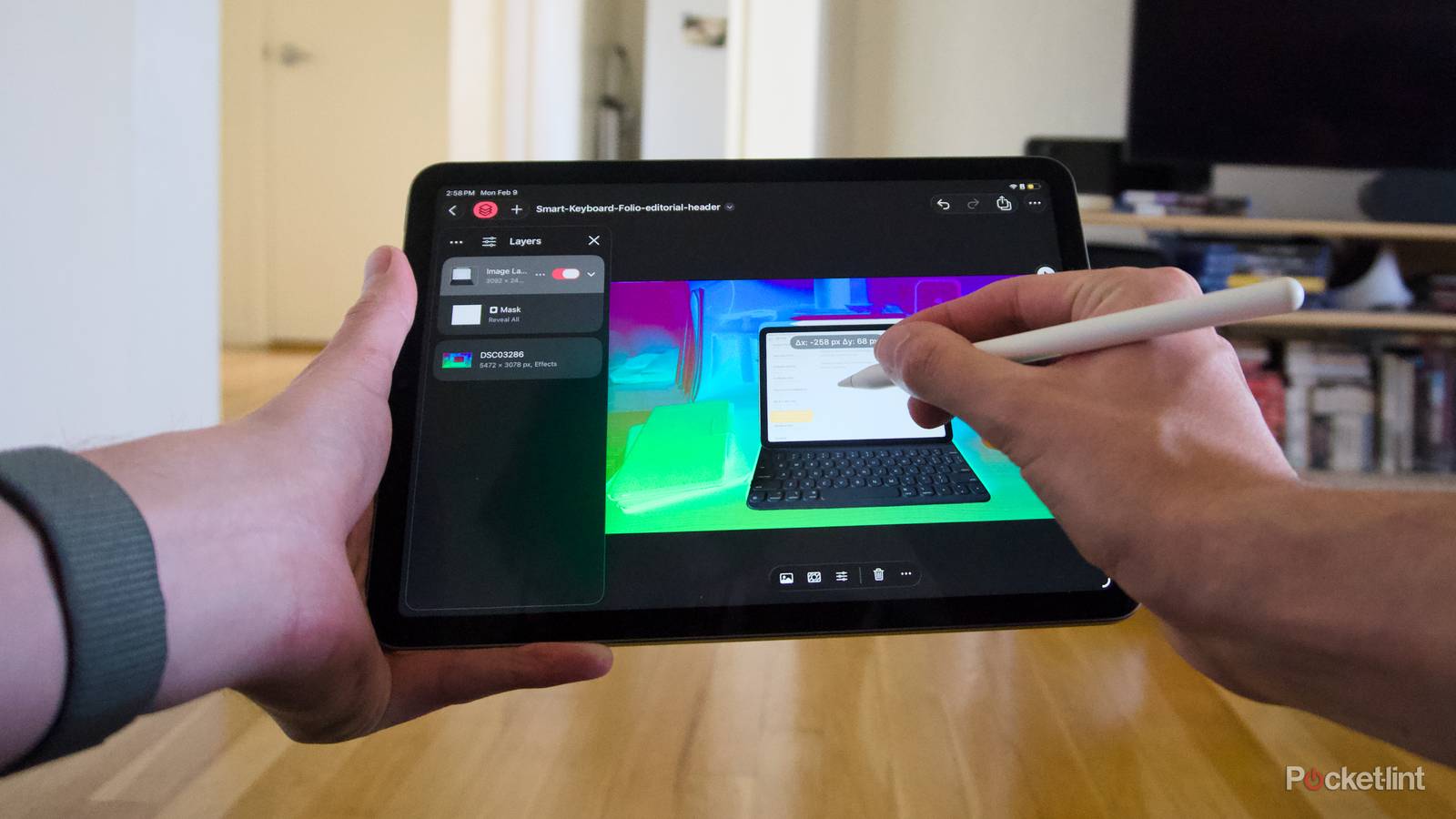
The right side of the app is devoted to a toolbar of different tools for selecting parts of an image, applying effects, retouching mistakes, erasing content, cropping, drawing, and more. The left side of the app is devoted to a collapsible layer menu, where the different layers and masks of your image live, and can be rearranged as you see fit. That leaves the center of the app for your canvas, where the image itself or whatever else you’re working on is and can be manipulated with the usual iPad touch gestures. Outside the workspace, Pixelmator Pro has also adopted Apple’s menu system. When you first open the app, you’ll find the same fullscreen spread of files to open, just like Apple uses in Pages, Keynote, and Numbers, and whichever screen you’re on, a macOS-style menu bar with dropdown menus like File, Edit, and View are accessible whenever you need them (a recent addition to the iPad included in iPadOS 26).
If, like me, you’ve used Pixelmator Pro for a while, navigating Pixelmator Pro for iPad should be immediately familiar. The app is deliberately very similar to its desktop counterpart for a reason. That doesn’t mean there aren’t advantages to using the app on an iPad, or specifically paying for the Apple Creator Studio version, though.
The iPad is a natural fit for Pixelmator Pro
Editing with your fingers and stylus just makes sense

Perhaps unsurprisingly, I really enjoyed using Pixelmator Pro with an Apple Pencil. The fine detail work of selecting parts of an image, erasing things, and just generally manipulating things on screen just feels right with a stylus on a tablet. Learning where everything was and how I would use Pixelmator Pro has a learning curve that I’m still getting a handle on and, for whatever reason, I always forget how to make a mask, but otherwise the app feels smooth and fast to use.
I’m not sure if the Warp tool should be the reason anyone should subscribe to Apple Creator Studio…
What’s extra nice too is that, because iPadOS 26 is trying to be a bit like an alternate-universe macOS, you can use all the apps without a stylus if you want, and it works nearly as well as the desktop version. In fact, I frequently set up projects with my iPad Air on a Magic Keyboard, loaded in images from the Files app, and then popped my iPad off its keyboard and used an Apple Pencil once I actually started editing. It feels natural, and the only thing that could make it better is if I didn’t have to remove my iPad from its keyboard at all.
Besides the basic flexibility of using an iPad, the Apple Creator Studio version of Pixelmator Pro also includes a tool that’s exclusive to subscribers. It’s called Warp, and it lets you manipulate, nudge, and generally reshape an entire layer of your project with natural curves created by sliders, your mouse, or an Apple Pencil. In my brief time using it, the Warp tool was a flexible way to fit an image in one layer around another — replacing the content of a screen with a warped screenshot, for example — and seemed like it could be equally good for more experimental edits. I’m not sure if the Warp tool should be the reason anyone should subscribe to Apple Creator Studio, though, which is a larger problem for Pixelmator Pro as a whole.
Pixelmator Pro for iPad should be available separately
Why can’t I pay for a subscription to a single app?

Pixelmator Pro for iPad works well and is a natural translation of Pixelmator’s already excellent desktop app. Which makes it all the more frustrating you can only get it on your iPad with an Apple Creator Studio subscription. As an exclusive, it might get some people to pay monthly, but it seems equally possible the cost will drive people to the many alternative image editing apps on the App Store. That likely doesn’t bother Apple because it gets a cut of those transactions, too, but it does mean that a good app is a little more annoying to use.

- OS
-
MacOS, iPadOS
- What’s included?
-
Pro image editing software
Pixelmator Pro is an updated version of the class macOS image editing app that’s included in Apple Creator Studio and now runs on iPadOS.
To avoid relitigating the problems with packaging everything under one subscription, Pixelmator Pro for iPad should be available to purchase in some other way. It doesn’t have to be a standalone purchase, and it could even be a single app subscription, like Apple used to do with Final Cut Pro and Logic Pro for iPad. But as is, making the app an exclusive hurts its chances of being enjoyed by more people.