Summary
- Gimbals are essential for smooth iPhone footage; Flow 2 series majorly ups shot quality.
- Flow 2 = easy, affordable, foldable, great for casual creators; AI tracker accessory works well.
- Flow 2 Pro clears the field: built-in AI tracking, Apple DockKit, full 360° motion; pro choice.
One of the most important things to have in any bag as an iPhone content creator is a good gimbal, and the market knows this better than anyone. There are a plethora of options available out there, and Insta360 has been at the forefront of that marketplace for a long time. However, in recent years, DJI has seen its own growth.
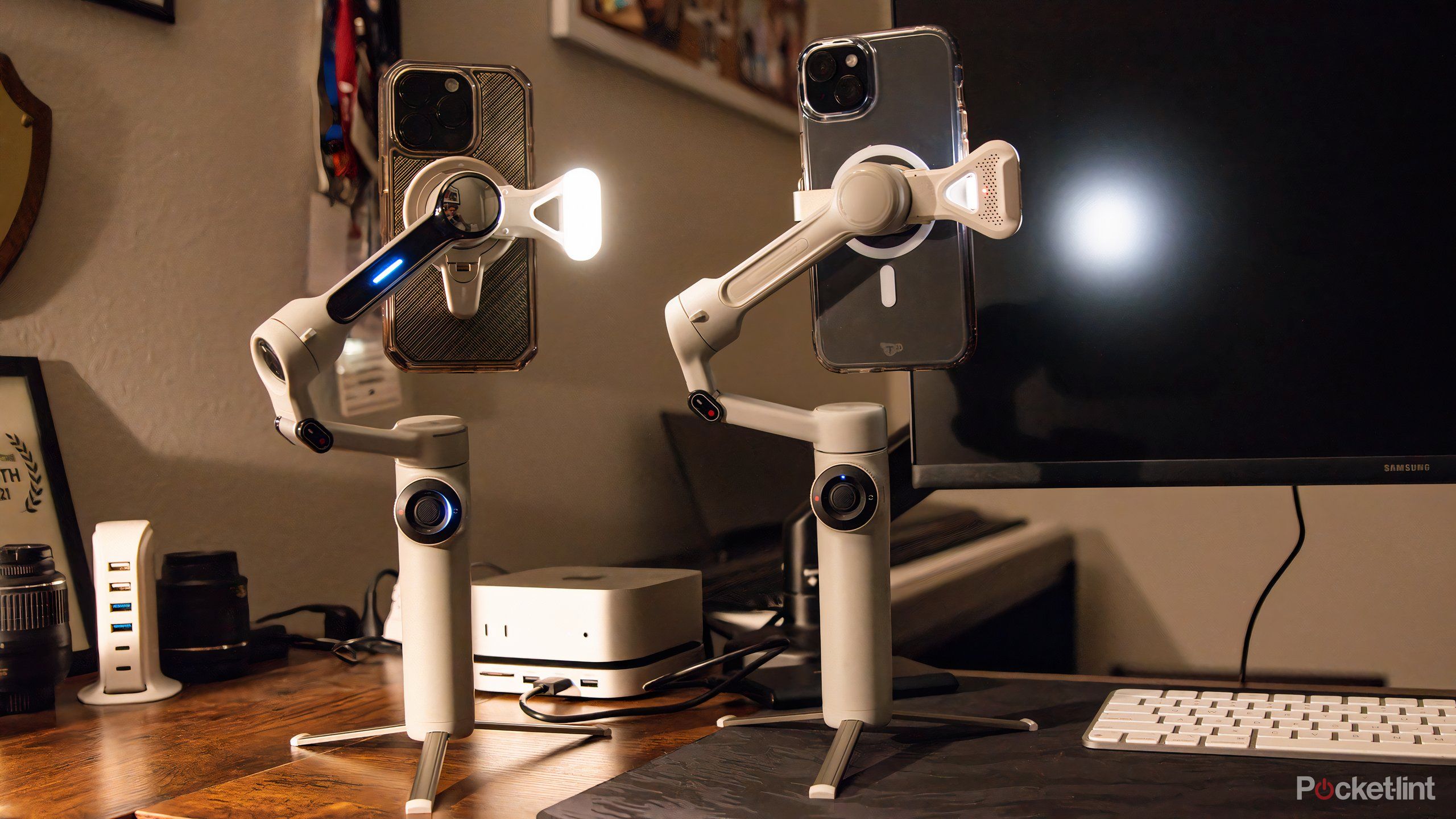
Fast-forward to 2025, though, and Insta360 has stepped up its game, too, with the Flow 2 and the Flow 2 Pro. The former is meant to be a more entry-level gimbal, with the Pro being designed for creators who are looking to either level up their game or deliver to clients. I tested both of them rigorously, and oh boy, do I have some thoughts.
Why is a gimbal so important
Professional-grade quality at budget prices

One of the biggest differences that I can always spot in any iPhone footage is whether a gimbal was used, and once you look at the differences side-by-side, it’s easy to tell. A gimbal simply provides a more stable, smooth shot than anyone that’s not a surgeon can with their hands. And if you were a surgeon, you probably wouldn’t be worried about creating content anyway, so here we are.
For anyone looking to do things like grow their following on social media, deliver high-quality content to clients, or simply document their travels in the best way possible, a gimbal is the most useful tool in any bag when it comes to shot stabilization and quality. Insta360 realized this with its original flow series, as it was our best overall gimbal in 2024, and the Flow 2 series only improves over what was an already stellar product.
What are the differences
How much more “Pro” does the Flow 2 Pro get

As I mentioned earlier, the Flow 2 is meant to be a more entry-level gimbal for those who may have never used one before or are doing light content creation, and for those purposes, it works wonderfully. The AI Tracking accessory works like a charm and is plug-and-play directly into the upper arm of the gimbal. The range of motion is solid, too, even if it’s not a full 360-degrees. The Flow 2 is one of the easiest gimbals to use straight out of the box that I’ve come across, and it earns real brownie points for that.
However, if you’re looking for what I truly believe to be the best gimbal experience on the market, the Flow 2 Pro offers more bang for the extra buck. It doesn’t reinvent the wheel to do so, though. For instance, instead of having to plug in the AI tracker, the Flow 2 Pro comes with the tracking capability pre-baked into the software. What’s more, it can also be used with Apple Dockkit, which means that you can create high-quality video outside the Insta360 app while maintaining full functionality — a feature that I am incredibly fond of.
How and what did it work out for me
Even in a very niche role, the Flow 2 performed

When I’m not writing about the best consumer tech and automotive news here at Pocket-lint, I’m an independent photographer, videographer and PhD student based in West Texas. I spend most of my summers at the racetrack shooting photos and video of local drivers, and this is where I decided to put the Flow 2 and Flow 2 Pro to the test.
As you can imagine, most of my videos require a lot of panning, and unless you go back to Adobe Premier or Capcut to stabilize in post, there’s not much you can do to avoid a lot of vibration and camera shake in your videos without any sort of gimbal. This, combined with the tracking ability that the Flow 2 and Flow 2 Pro have made them ideal candidates for this kind of work.
I tested the Flow 2 and Flow 2 Pro standing in a 7/8 mile oval infield in turns three and four, along with standing at the start/finish line of the track. The AI trackers didn’t not keep up with close-up subjects well, but performed exceptionally at distance.
I would be remissed if I didn’t say this — the tracking feature works wonderfully for people and smaller objects in the frame, along with slower-moving objects. However, when it came to race cars whirring past, the trackers lost sight of them and weren’t able to regain focus, which wasn’t surprising, as very few gimbals can keep up with that kind of up-close action with their internal motors alone in handheld mode.
That doesn’t mean that they weren’t useful, though. My shots were still stable, and if I tracked them myself, they were still far smoother than if I had only shot them with my hands.
What else can they help with
Gimbals aren’t just for action shots, after all

One of the biggest supporting elements of any gimbal is that they’re so portable. The Flow 2 and Flow 2 Pro both fold into themselves, and come with a small carrying bag that’s perfect for throwing in any backpack or even an extra pocket if you have one available, although I wouldn’t recommend doing so. The other beneficial element of these particular gimbals is that they come with built-in tripods for stationary shots, which are game-changers for videos in which you wish to appear on camera yourself.
These instances are where the tracking truly shines. I played around with the Flow 2 and Flow 2 Pro set up on Insta360’s tripod, and the trackers worked absolutely flawlessly, no matter where I moved or how quickly I shifted. This is because when the tripod is engaged, the Flow and Flow 2 Pro can enter “Tracking+” mode, which enables them to move along with subjects quicker than if they were simply resting in the user’s hands. For any type of review content or even video meetings, the Flow 2 and Flow 2 Pro come packed with ample tech.
Which one should you buy and why
Let’s get down to brass tacks, shall we

Overall, the Flow 2 and Flow 2 Pro are both fantastic gimbals, and at the price point, each is the best in their class. However, on the subject of which one is the better deal, I think the Flow 2 Pro completely clears the base model in every way imaginable. The features list is too advanced to recommend anything else.
From the Apple Dockkit accessibility and on-board AI tracking to the full 360-degree range of motion, the Flow 2 Pro is just too much better than the Flow 2 and even its DJI competition to be ignored. For example, a few of those features are:
- Apple Dockkit compatibility for shooting outside the Insta360 app
- Embedded AI tracking capability in the phone mount stalk
- Access to the Insta360 App which allows easy integration to the gimbal’s best features
- Full 360-degree motion across multiple axes and best-in-class tracking software
- Touch-sensitive scroll wheel to quickly swap between video modes and shot types
- (My favorite) a reflective mirror on the back of the phone mount to ideate on selfie video setup
These might not seem like much, but in comparison to the DJI competition, these features make life all that much easier. For the small price increase, the difference in what kind of and quality of content you can create with the Pro over the Flow 2 is vast. However, for the casual vlogger or creator, the Flow 2 offers by far the best bang for your buck in the introductory gimbal space.