In August, Roku added six more free live channels to its Roku Channel, a week after adding four others. Both batches landed on a service that already carried more than 500 free live TV channels, and if you own a Roku, neither arrival will have announced itself to you. New channels just appear in the Live TV Guide, somewhere among the hundreds already sitting there. Roku has spent five years building one of the largest free lineups in US streaming, and seemingly less time working out how anyone is meant to navigate it.
The Roku Channel added around 80 free channels in six months
But the number you actually watch hasn’t moved much

When Roku launched the Live TV Guide in 2020, it carried a little over 100 channels, but by 2023, the company was quoting 350-plus. It passed 500 in early 2025, and it has kept climbing since, with roughly 80 new free channels arriving in the first half of 2026 alone: more than 30 between June and July, 15 in May, and another 30 in April.
That is a genuinely impressive acquisition rate, and on paper, it’s good news for anyone tired of streaming price hikes. In practice, though, the growth has run well ahead of the watching habits.
TiVo’s Q4 2025 Video Trends Report, published in June and based on data from 4,493 adults across the US and Canada, found that the average FAST user (aka free ad-supported streaming television) watches 7.5 channels. That figure is up by more than two year over year, so engagement is rising rather than stalling. It’s still 7.5 out of more than 500, though. The same report also found that 40% of viewers check two or three different apps before settling on something, pointing to a discovery problem rather than a supply problem.
Roku keeps shipping fixes for a problem it’s making worse
Yet each one arrives after the fact

Roku hasn’t ignored any of this, and in February 2025, it added a personalized row to the top of the Live TV Guide, surfacing 10 channels based on your viewing habits, explicitly so people would scroll less. With Roku OS 15, a search bar was added to the guide, letting you type or speak a channel name or genre instead of working through categories. In March, it added a Local News Near You section that uses your location to pull up nearby affiliates.
The search bar is a real improvement, and we’ve written about how much Roku’s live TV guide search changed the way we find free live TV.
But that brings me to the awkward part. Three discovery features in 18 months aren’t the behavior of a platform that has solved navigation. Search is a fix for a guide that got too long to browse, and the personalized row is a fix for a guide that got too long to browse. Each one helps a little, but none of them touches the original sin of an ever-expanding list of channels.
More channels mean more ad inventory
But curation doesn’t sell the same way

The reason for all this isn’t some great mystery. The Roku Channel is free because it is advertising-funded, and every additional FAST channel is another place to sell advertising. A channel running a decades-old game show to a modest audience still carries ad breaks, and the library content that fills those channels is cheap to license.
So the incentive to add is structural and more or less continuous. The incentive to prune, merge, or retire a channel almost nobody watches is seemingly much weaker, since a channel with a tiny audience costs Roku very little and costs you only the second it takes to scroll past it. Multiply that second by 500, and you have the current experience.
That isn’t a scandal, and I wouldn’t dress it up as one. We’ve made the broader case against free channels on quality and privacy grounds, and I don’t need to repeat why it’s a concern. The more specific point is that the guide is unlikely to get shorter, and the job of making it usable has been handed over to you and me.
They’re the closest thing to a fix you’ll get

Roku does give you the controls. In the Live TV Guide, you can move left until a channel’s name and logo are highlighted, then press the Star button to open the Channel options menu. From there, you can select Hide this channel, or go to Manage channels, then Manage channel lineup, to check off a batch in one go. The same menu holds Favorite channel and a Filter option that restricts the guide to All channels, Recents, or Favorites.
Building a Favorites list and then filtering the guide to it is the closest Roku gets to letting you turn 500 channels into the seven or eight you use, and it takes about 10 minutes.
If you have a Roku TV with an antenna connected, there is an even simpler option in Settings, under TV inputs and then Live TV, where Hide streaming TV channels lets you hide the streaming lineup wholesale and keep your over-the-air channels. And if the clutter you are fighting is on the Roku home screen rather than inside the guide, that is a separate set of settings, and one we’ve covered in detail.
None of this stops the guide from growing. Roku will add another batch next month, and most of it will scroll past you on the way to the one channel that shows the film you’re curious to check out. What is strange is that building your own short list (a dozen channels, everything else hidden) gets you something close to what those 500 were supposed to deliver in the first place. Only smaller, and chosen by you.
-

4/5
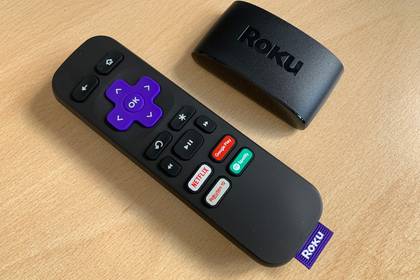
Roku’s entry-level device offering 1080p streaming, but supporting all the major streaming channels.
-

4.5/5
- Dimensions
-
3.7 x 0.80 x .45 inches
- Integrations
-
Roku Smart Home, AirPlay, Apple Hom, Alexa, Google Home
Another really solid option from a smaller name.
-

4/5
- Dimensions
-
4.9 x 5.0 x 1.0 inches
- Connective Technology
-
Bluetooth® streaming, 802.11ax dual-band MIMO Wi-Fi 6 (2.4 GHz / 5 GHz), 10/100 Base-T Ethernet
- Brand
-
Roku
- Audio outputs
-
Digital stereo over HDMI, DTS Digital Surround pass through over HDMI, Dolby Atmos decode via HDMI (with compatible speakers)
- Integrations
-
Works with Roku Smart Home, Apple AirPlay and HomeKit, Google Home, Alexa
The Roku Ultra has refreshed for the first time since 2021. A new backlit remote, faster performance, and Wi-Fi 6 support separate this 2024 edition from the past generation.
-
- Operating System
-
Roku OS
- Resolution
-
4K
- Ports
-
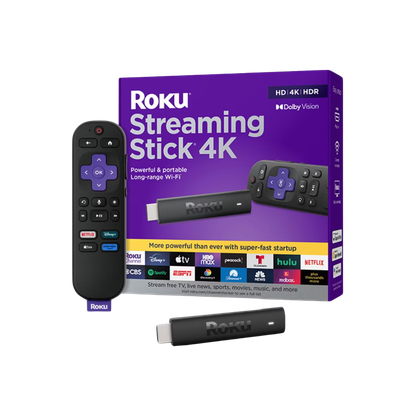
HDMI 2.0b, USB for Power & Long-range Wi-Fi receiver
- Connectivity
-
Wi-Fi
- Dimensions
-
3.7″ x 0.80″ x 0.45″
One of the most reliable plug-and-play streaming solutions on the market, the Roku Streaming Stick lets you pipe 4K entertainment from dozens of services to any HDMI-compatible set. With Dolby Vision support and a voice-controlled remote, it’s a great way to take your media from display to display.