With many people yearning for a return to physical media, it means more people are diving into the format for perhaps the first time. While that doesn’t describe me particularly, I’m still learning quite a bit about it with each passing day. In my living room, I have a 4K Blu-ray player connected to a Denon S760H receiver, and that’s where I do the majority of my viewing.
In a spare bedroom, I have a Fire TV with a PlayStation 5 plugged into it. Over time, I added an old receiver I found at a thrift store to it, so it’s turning into a spare home theater of sorts. While I don’t plan to replace my living room setup with it, I have enjoyed watching some movies there ever since I got a love seat for the room. I use the PS5 as my Blu-ray player, and it actually works quite well. There are still some key limitations, notably the lack of Dolby Vision.
As it turns out, my audio was lacking as well. I chalked it up to using an old Yamaha without 4K HDMI ports, but there was a setting I had to change on the PS5 to make sure my audio was coming out in the supported formats. This receiver isn’t a Dolby Atmos one, but it supports DTS and other Dolby audio formats, so I’d still like it to handle the audio where it can. This is done by changing a single setting.

- 4K Capability
-
Yes
- Game support
-
PS5, PSVR 2, PS4, PSVR
- Processing Power
-
10.3 TFLOPS
- Storage
-
825GB SSD
- CPU
-
x86-64-AMD Ryzen Zen 8 cores
- Dimensions
-
390 × 104 x 260 mm
One setting change fixed my problem
Very easy fix

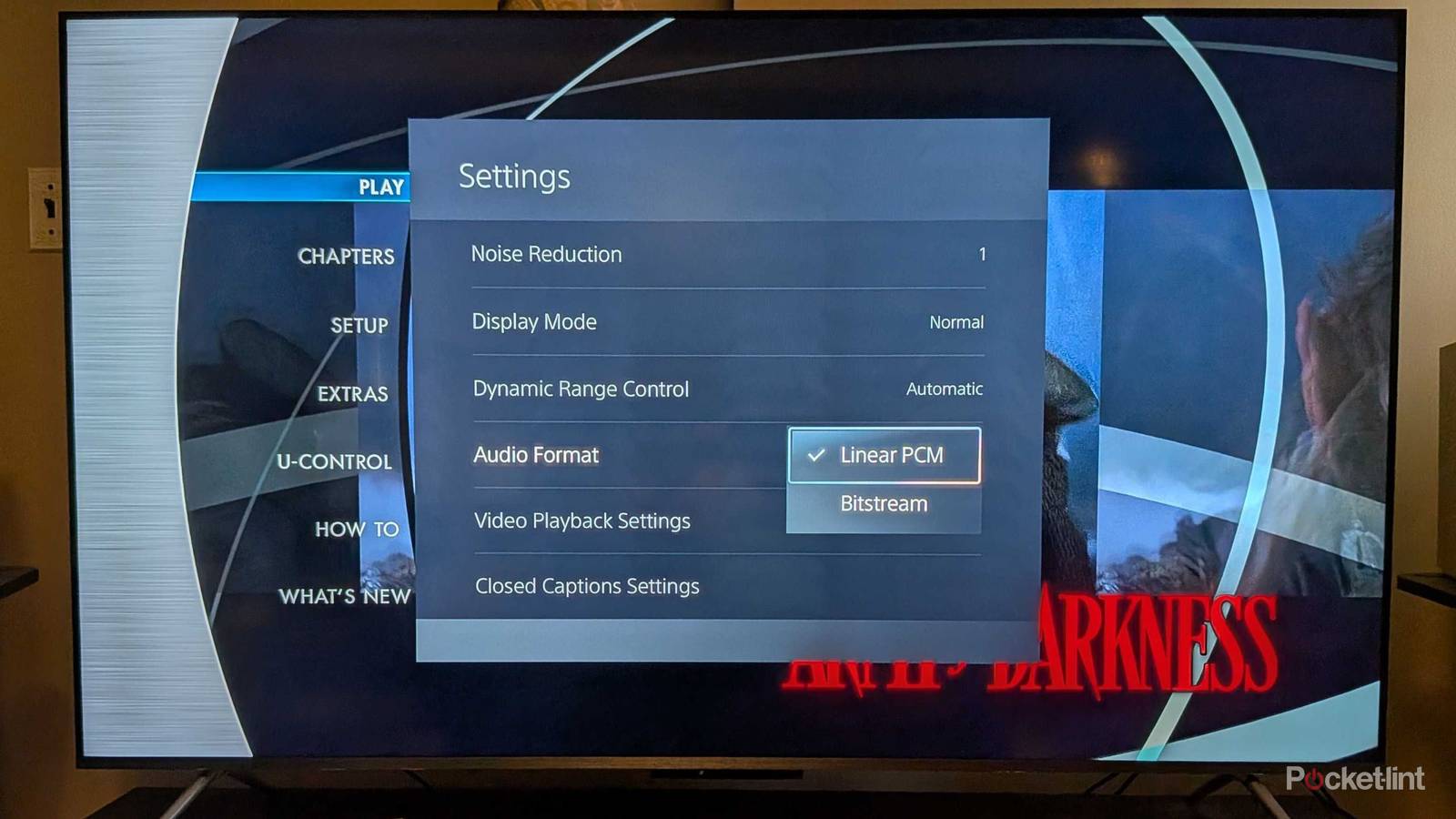
On your PS5 controller, all you have to do is click on the start button and open up the menu to get into your settings. Once you’re there, look for audio format. By default, mine was set at Linear PCM, which isn’t a bad format. This is an uncompressed audio format, so you’re not getting horrible sound by any means. In fact, a lot of people might not realize the difference, and if you’re watching through TV speakers, this is probably the best option available to you.
However, if you’re using a receiver, you’ll want to change this from Linear PCM to Bitstream. The reason for this is that Bitstream takes the audio and passes it along directly to your receiver, untouched by another source. If you have a receiver, you probably have it to get the best sound that you can get. This means you wouldn’t want the PS5 to get its hands on it, and that’s what happens here. The PS5 as a middleman is completely cut out, and the audio is given directly to your receiver for it to decode. If you’re looking for a Dolby Atmos or DTS:X soundtrack, this is the way to do it — especially if your receiver is plugged into your TV’s eARC port.
You should also go into your PS5’s sound settings and change your audio output from TV speakers to AV receiver. This lets you choose between 5.1 or 7.1 speakers, so pick what you have and go from there. If you just have a pair of stereo speakers plugged in, you can actually stick with Linear PCM as your audio output and pick the two-channel option from your PS5 settings. A good rule of thumb is to pick a format that lines up with the number of speakers that you have.
The reason why I’d stay with Linear PCM if I only have two speakers is that formats such as Dolby Atmos require having multiple speakers to get the best audio. With just two speakers, that’s not going to happen, so regular 2.0 audio is perfectly okay in this case.
Change your TV settings to match this too
Passthrough on everything

My TV also has some settings that need to be changed to ensure no audio is getting muddied along the way. On my Fire TV, it’s a simple fix as all you need to do is go into the settings and make sure my audio output is set to passthrough. I want my receiver to handle the audio on all my devices, so this makes sure my TV isn’t going to do it. That’s not the worst thing in the world if you have a TV that supports modern audio formats, as many of them do. I just have a receiver for the sole purpose of doing this for me, so I’m going to make sure that it does.
I’m glad that my PS5 and TV give me the option to do this in the first time, because my Apple TV 4K doesn’t. Instead, my Apple TV 4K takes the audio and handles it itself, which is fine when it’s a Dolby Atmos mix. Unfortunately, that’s not the case with everything I watch, so it’s annoying to see my receiver not be able to do what it’s meant to. The audio still sounds fine, but it could be much better if my receiver could do it.