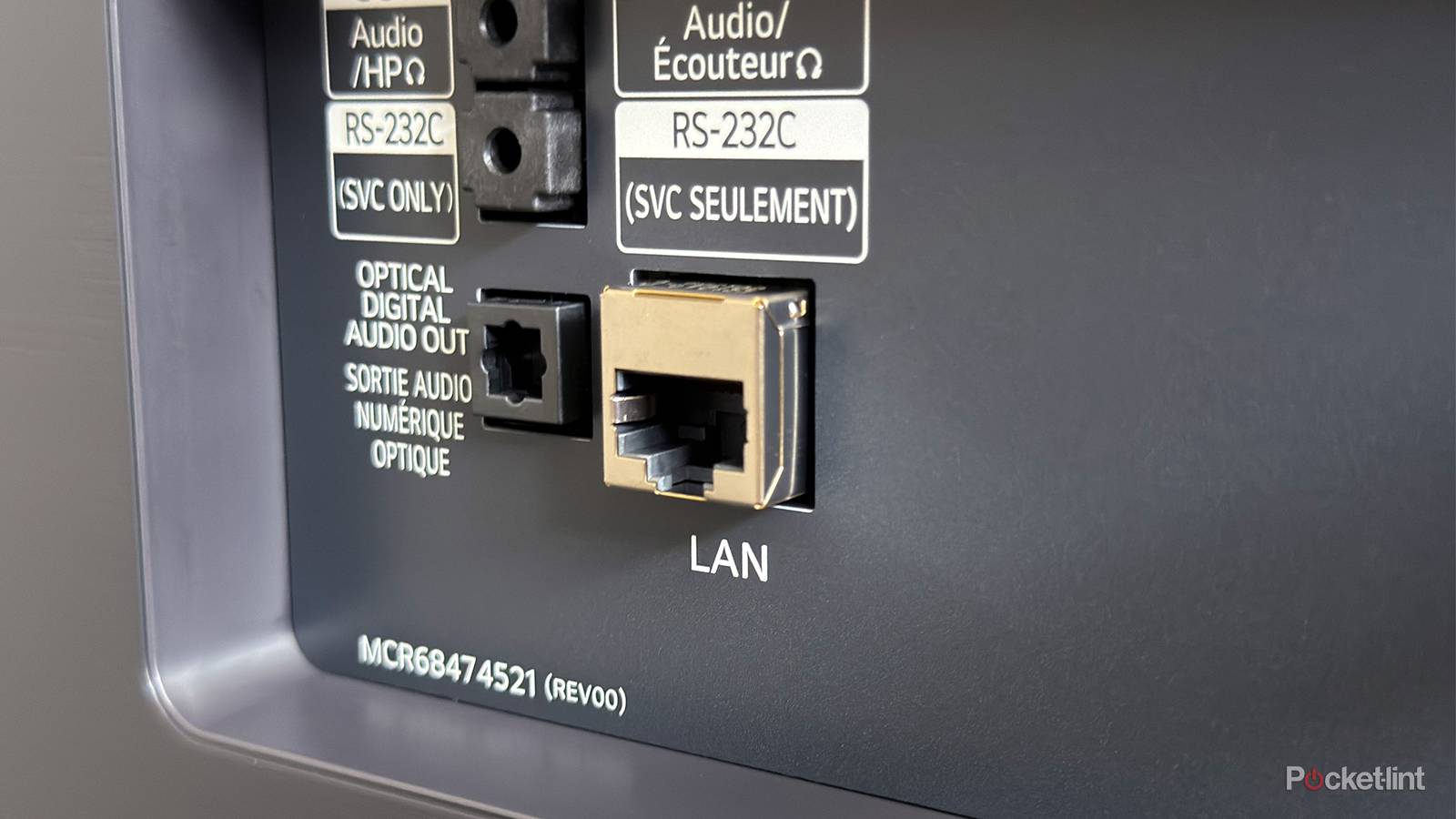
Your smart TV is essentially a central computer hub, a means of enjoying entertainment via any number of connected devices and streaming platforms. Those devices can be connected from Wi-Fi or externally, with a number of ports built-in to meet a range of possibilities.
Most people are familiar with HDMI cables and USB connections and the devices they service. But those aren’t the only ports on the back of your smart TV. There’s another one you may not know as well that’s been around for far longer.
What is RS-232 port and what does it do?
A dated and simple connection

The lesser-known port in question involves RS-232; the letters stand for Recommended Standard. RS-232 is essentially a communication standard or protocol. This type of connection has been around for a long time, and it hasn’t changed much. You can trace its history to over 60 years ago, when it was used in devices such as teletype machines and the earliest computers.
Basically, the connection is a way for two devices to talk to each other. It’s a simple connection defined by low voltage and specific pins that allows devices to link up to send serial commands. It was so simple and cheap that it became ubiquitous on a variety of devices. You could also run a lengthy cable to send RS-232 commands, which added convenience in decades past.
RS-232 is a protocol, and not an actual cable; indeed, the physical cable can actually come in different shapes. You may have seen cables that use RS-232. Trapezoidal cords with nine pins were popular once upon a time and became the common way to connect to a computer. Older models were even bigger and contained more pins. Today, they are much smaller, with some resembling audio jack connections.
How RS-232 connections faded from use
Cables were designed for audio and video transfer

This connection supported computer peripherals, such as keyboards and mice. However, it wasn’t particularly fast or convenient when it came to personalized computing. While the connection was also hooked up to a modem, it was replaced in the early 90s by a number of cords we still use today.
RS-232 was no longer as useful as USB, Ethernet, and HDMI cables. These devices were more specialized, offering faster speeds and the ability to transfer more data. RS-232 connections were bigger and more involved; these newer connections streamlined the experience. However, there is still a use for cable by certain populations, and that’s why it’s still included on your TV.
How RS-232 smart TV ports are used today
Select professionals use the protocol

Since the connection does not transfer audio or video, it’s not used by consumers for any entertainment purposes. There is no source device, however old, that you’re hooking up to that port in order to watch or listen to something.
Instead, it’s used for a variety of business endeavors. Commercial sectors, especially hotels and conference centers, use the port to rig up video and audio systems. It can also be used by home automation centers. Perhaps most common, however, are technicians who use the port to run diagnostics and systems checks. That’s why you may see notes on the port that indicate it’s for servicing the model. It’s used for fixing, not for entertainment.
The reason it’s still around is that it’s both simple and stable. It allows for lengthy cables to be run from it, which assists in large commercial displays and entertainment setups. Such connections are cheaper than HDMI as well and take up far less bandwidth because these connections aren’t transferring big audio or video files, they’re just taking in simple commands. They’re not relying on Wi-Fi or internet connections that can drop out at random, either.
If you’re keen on actually seeing how it works, you’ll need a couple of devices. You’ll need some kind of adapter, likely a USB-to-RS-232 connector for a computer, and then you’ll need the right cable to match the type of port your TV has. Different TV brands use different styles of cables. Once you connect physically, you’ll need a serial terminal in order to set parameters and send commands. And once you figure all that out, you can use it to turn on your TV and maybe work the volume.
Focus on your HDMI and LAN connections
Best practices and proper compatibility enhance quality

It’s helpful to know what your TV is capable of and what everything in it does exactly. And now that you know about the RS-232 port, you can go ahead and ignore it. Unless you’re in a professional industry that deals with A/V setups, you won’t really ever need to go near this port.
Instead, it’s worth learning more about your HDMI ports and your LAN connection. These two hookups are crucial to unlocking the best audio and video experience in your home. An Ultra High Speed HDMI cable allows for 4K resolution and the top HDR formats to be transferred from a device to your screen while also supporting high-end audio as well. An Ethernet cable, meanwhile, provides you with a more stable connection when streaming titles. These two cables support your home entertainment system.