


I have accomplished the unthinkable: I have learned to sleep soundly through the night without my phone at my bedside. Please, hold your applause. If it weren’t for the Dreamie alarm clock, I’m not sure that this Herculean feat would have been possible.
If it feels as though I am bragging that I brushed my teeth this morning, then you are not Dreamie’s target audience. But I certainly am, and I’m not alone in feeling so attached to my phone that I’m basically a cyborg.
I know that using my phone in bed interferes with my sleep, and poor sleep interferes with basically everything else about my mental and physical health. Yet before Dreamie, I went more than a decade with my phone at my bedside every single night – that’s tens of thousands of nights spent so attached to my glowing rectangle that I couldn’t imagine the horror of waking up in the middle of the night without it.
I’m not totally helpless. Over the last few years, I’ve established a habit of reading before bed, which makes me feel markedly more relaxed when it’s finally time to shut my eyes. Still, I’ve never been a good sleeper (just ask my parents, who suffered endlessly for taking me to see a museum exhibit about the Titanic when I was a child, which made me think I was going to die on the Titanic). Sometimes, when I can’t drown out my noisy brain, the only thing that can get me to sleep is to close my eyes and listen to podcasts or audiobooks (as long as they’re not about the Titanic).
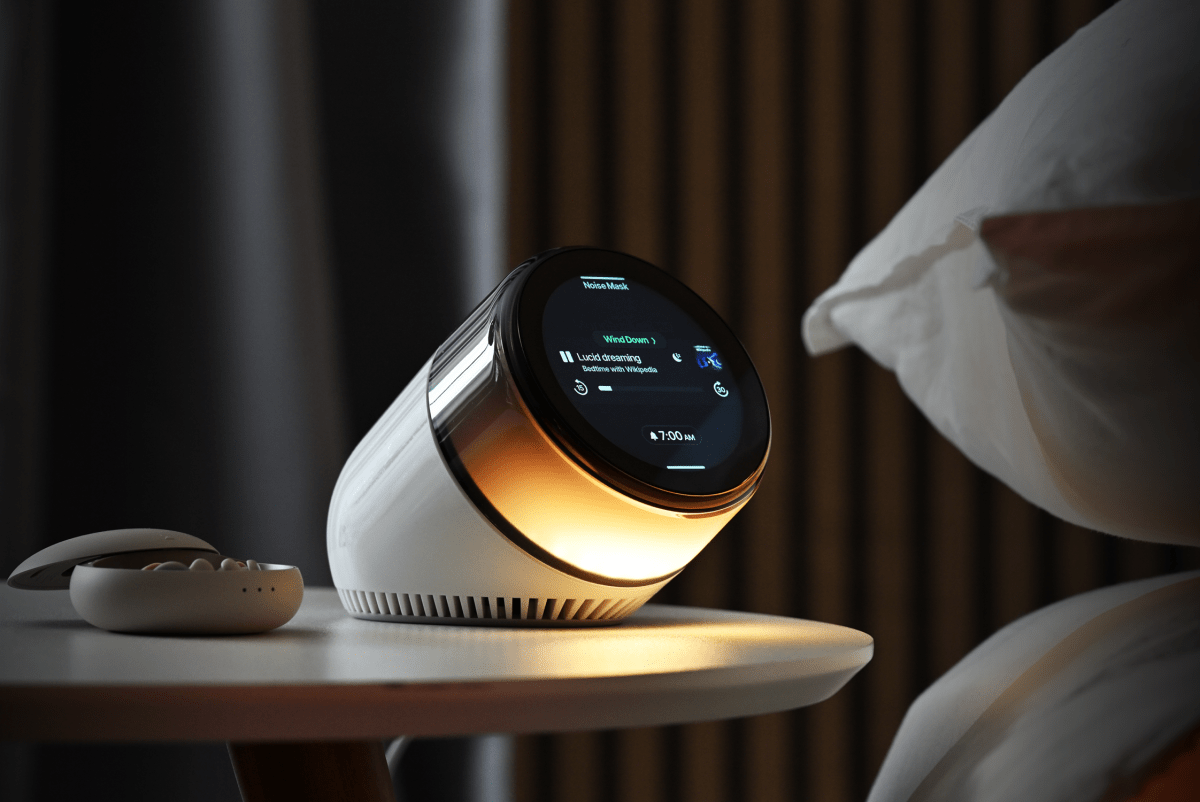
Whoever designed the Dreamie seems to share my affliction, because what sets Dreamie apart from all of the other fancy alarm clocks is laughably simple: It can play podcasts.

Before we get to the podcasts, though, we need to zoom out. Here’s how Dreamie works.
In “ambience” mode, it’s just a normal clock – but it has another series of modes that make up your sleep routine.
The “wind down” starts your routine, signaling that it’s almost time for bed. I have mine set to sound like a fireplace crackle with a soft, orange light, which fades and glows to imitate actual fire. I have the fireplace running for about 25 minutes, during which I’m usually reading. Then, it transitions to the “noise mask” mode, which I set to sound like a thunderstorm — but if I get sleepy earlier, I can turn it on then. Whatever sound you pick will play until your wakeup routine begins, with the “sunrise” light slowly getting brighter until it’s time for your alarm to go off. (You can also choose no sound, if you prefer.)
Dreamie’s best feature is its “back to sleep mode.” If you wake up in the middle of the night, you can turn on “back to sleep,” which plays whatever media you choose, whether it’s a breathing routine that comes loaded onto the device, another soundscape, or any podcast you want to listen to. You can choose the episode or show ahead of time so that you’re not scrolling around the interface in the middle of the night, making you feel even more awake. You can opt to use Dreamie with Bluetooth headphones, so if you share a bed with someone else, you won’t disturb them… but you have to wear headphones to sleep.
Dreamie is Wi-Fi enabled, which means it can download whatever podcast you want from the internet. For that, you have the architecture of podcasts to thank – since podcasts are distributed by RSS feeds, any developer can create their own custom RSS app, which is how Dreamie can play them. (Let’s take a moment to appreciate RSS, one of the last relics of the open internet, which Spotify has actively tried to quash in favor of its own walled garden.)

It’s embarrassing that this feature is so useful for me. Usually, if I wake up and can’t fall back asleep, I have to pick up my actual phone to turn on a podcast. But you see, I’m a millennial, which means that if I’ve gotten any notification after I’ve fallen asleep, I will reflexively open that notification before I turn on my podcast or audiobook. From there, it’s a cascade of bad decisions that lead to me being awake for two hours in the middle of the night.
My own actions are to blame here, but I know that my bad habits are not unique – one survey of 2,000 American adults found that 87% of us sleep with our phones in our bedrooms. I don’t need scientific studies to tell me that I sleep worse when I spend too much time looking at my phone, but there’s data to support my experience. With Dreamie, I can simply just swipe down to turn on the “back to sleep” mode and listen to nerds talk about baseball statistics.
My bad phone-in-bed habits extend to the morning. When I wake up, I usually spend about half an hour scrolling on my phone before I get out of bed. But if I’m not distracted by my phone, I can get out of bed much faster and start my day feeling like a person, rather than a hungry, caffeine-deprived zombie who has to pee.
Dreamie costs $250, which is steep for an alarm clock. At least there’s no subscription or companion app that you need to download. Even though it’s pretty dense with features, the user interface is pretty straightforward, resembling the iPhone Clock app.
At times while testing the Dreamie, I “cheated” and used my phone in bed to listen to audiobooks (sometimes, you just really want to listen to something specific that isn’t a podcast). At first, I kept the spirit of the Dreamie alive and prevented myself from using my phone for any other reason. But that just wasn’t realistic. Inevitably, I used my phone in the middle of the night.
I don’t know if Dreamie can ever realistically support apps like Libby or Libro.fm, since there are technical limitations at play. Maybe in the future, Dreamie can give us a way to upload our own media, including downloaded audiobooks.
Toward the end of my review period with Dreamie, I also started testing the Brick, which I have been using to block every app on my phone at night except for podcast and audiobook apps. At $59, it’s more affordable than the Dreamie, so if I were to buy one of these devices for real, I think I’d be able to get most of the same benefits from the Brick. Still, there’s something nice about being able to leave my phone in a completely separate room. Even if your phone is “Bricked,: it’s still your phone. And do you really want your phone to be the last thing you see every day?
When you purchase through links in our articles, we may earn a small commission. This doesn’t affect our editorial independence.